<?xml version="1.0" encoding="utf-8"?><feed xmlns="http://www.w3.org/2005/Atom" ><generator uri="https://jekyllrb.com/" version="4.2.2">Jekyll</generator><link href="https://thomas.preissler.me/feed.xml" rel="self" type="application/atom+xml" /><link href="https://thomas.preissler.me/" rel="alternate" type="text/html" /><updated>2023-06-15T19:50:13+00:00</updated><id>https://thomas.preissler.me/feed.xml</id><title type="html">Thomas’ Blog</title><subtitle>My personal thoughts on technology and oddities.</subtitle><author><name>Thomas Preißler</name></author><entry><title type="html">Leveraging the Power of JavaScript Generator Functions: Keep Database Batch Operations clean and maintainable</title><link href="https://thomas.preissler.me/blog/2023/06/14/javascript-generator-functions" rel="alternate" type="text/html" title="Leveraging the Power of JavaScript Generator Functions: Keep Database Batch Operations clean and maintainable" /><published>2023-06-14T20:00:00+00:00</published><updated>2023-06-14T20:00:00+00:00</updated><id>https://thomas.preissler.me/blog/2023/06/14/javascript-generator-functions</id><content type="html" xml:base="https://thomas.preissler.me/blog/2023/06/14/javascript-generator-functions"><![CDATA[<p><strong>In Node.js applications, querying a database in batches can be a common requirement when dealing with large datasets. In this blog post, we’ll explore how generator functions can streamline the implementation to keep the code clean and maintainable.</strong></p>

<p>The blog post is divided into 4 steps:</p>

<ol>
  <li><a href="#1-simple-querying-without-batch-operations">Simple Querying Without Batch Operations</a></li>
  <li><a href="#2-implementing-batch-queries">Implementing Batch Queries</a></li>
  <li><a href="#3-using-generator-functions-for-batch-queries"> Using Generator Functions for Batch Queries</a></li>
  <li><a href="#4-clean-code-extract-the-batch-logic-into-its-own-function">Clean Code: Extract the batch logic into its own function</a></li>
</ol>

<h2 id="1-simple-querying-without-batch-operations">1. Simple Querying Without Batch Operations</h2>

<p>Suppose we want to send a notification to all our users, we would need to retrieve all users from the database using TypeORM, iterate over each individual user and send the actual notification. The code is clean and split up into the more general function <code class="language-plaintext highlighter-rouge">sendOfferToUsers()</code>, whereas the database query logic is encapsulated into <code class="language-plaintext highlighter-rouge">findAllConfirmedUsers()</code></p>

<div class="language-typescript highlighter-rouge"><div class="highlight"><pre class="highlight"><code><span class="k">async</span> <span class="kd">function</span> <span class="nx">sendOfferToUsers</span><span class="p">()</span> <span class="p">{</span>
  <span class="k">for</span> <span class="p">(</span><span class="kd">const</span> <span class="nx">user</span> <span class="k">of</span> <span class="k">await</span> <span class="nx">findAllConfirmedUsers</span><span class="p">())</span> <span class="p">{</span>
    <span class="kd">const</span> <span class="nx">message</span> <span class="o">=</span> <span class="s2">`Special Offer just for </span><span class="p">${</span><span class="nx">user</span><span class="p">.</span><span class="nx">name</span><span class="p">}</span><span class="s2">`</span><span class="p">;</span>
    <span class="k">await</span> <span class="nx">notifyUser</span><span class="p">(</span><span class="nx">user</span><span class="p">.</span><span class="nx">email</span><span class="p">,</span> <span class="nx">message</span><span class="p">);</span>
  <span class="p">}</span>
<span class="p">}</span>

<span class="k">async</span> <span class="kd">function</span> <span class="nx">findAllConfirmedUsers</span><span class="p">()</span> <span class="p">{</span>
  <span class="k">return</span> <span class="k">await</span> <span class="nx">userRepository</span><span class="p">.</span><span class="nx">find</span><span class="p">({</span>
    <span class="na">where</span><span class="p">:</span> <span class="p">{</span> <span class="na">confirmed</span><span class="p">:</span> <span class="kc">true</span> <span class="p">}</span>
  <span class="p">});</span>
<span class="p">}</span>

<span class="k">async</span> <span class="kd">function</span> <span class="nx">notifyUser</span><span class="p">(</span><span class="nx">email</span><span class="p">:</span> <span class="kr">string</span><span class="p">,</span> <span class="nx">message</span><span class="p">:</span> <span class="kr">string</span><span class="p">)</span> <span class="p">{</span>
  <span class="c1">// omitted for the brevity</span>
<span class="p">}</span>
</code></pre></div></div>

<p>While this approach works fine for smaller datasets, it becomes inefficient and memory-intensive when dealing with larger ones. To address this issue, we need to query the database in batches.</p>

<h2 id="2-implementing-batch-queries">2. Implementing Batch Queries</h2>

<p>To efficiently query large datasets from a database, it’s necessary to retrieve the data in subsets rather than all at once. This is achieved through batch operations, which involve querying the database multiple times and limiting the returned rows to a specific number while skipping the previously fetched rows.</p>

<p>TypeORM allows us to set <code class="language-plaintext highlighter-rouge">take</code> and <code class="language-plaintext highlighter-rouge">skip</code> attributes for batch querying, but it requires explicit configuration. Here’s an example of implementing batch operations:</p>

<div class="language-typescript highlighter-rouge"><div class="highlight"><pre class="highlight"><code><span class="k">async</span> <span class="kd">function</span> <span class="nx">sendOfferToUsers</span><span class="p">()</span> <span class="p">{</span>
  <span class="kd">const</span> <span class="nx">batchSize</span> <span class="o">=</span> <span class="mi">1000</span><span class="p">;</span>
  <span class="kd">let</span> <span class="nx">batchIndex</span> <span class="o">=</span> <span class="mi">0</span><span class="p">;</span>
  <span class="kd">let</span> <span class="nx">users</span><span class="p">:</span> <span class="nx">User</span><span class="p">[];</span>

  <span class="k">do</span> <span class="p">{</span>
    <span class="nx">users</span> <span class="o">=</span> <span class="k">await</span> <span class="nx">findAllConfirmedUsers</span><span class="p">(</span><span class="nx">batchSize</span><span class="p">,</span> <span class="nx">batchIndex</span><span class="p">);</span>
    <span class="k">for</span> <span class="p">(</span><span class="kd">const</span> <span class="nx">user</span> <span class="k">of</span> <span class="nx">users</span><span class="p">)</span> <span class="p">{</span>
      <span class="kd">const</span> <span class="nx">message</span> <span class="o">=</span> <span class="s2">`Special Offer just for </span><span class="p">${</span><span class="nx">user</span><span class="p">.</span><span class="nx">name</span><span class="p">}</span><span class="s2">`</span><span class="p">;</span>
      <span class="k">await</span> <span class="nx">notifyUser</span><span class="p">(</span><span class="nx">user</span><span class="p">.</span><span class="nx">email</span><span class="p">,</span> <span class="nx">message</span><span class="p">);</span>
    <span class="p">}</span>
    <span class="nx">batchIndex</span><span class="o">++</span><span class="p">;</span>
  <span class="p">}</span> <span class="k">while</span> <span class="p">(</span><span class="nx">users</span><span class="p">.</span><span class="nx">length</span> <span class="o">===</span> <span class="nx">batchSize</span><span class="p">);</span>

<span class="p">}</span>

<span class="k">async</span> <span class="kd">function</span> <span class="nx">findAllConfirmedUsers</span><span class="p">(</span><span class="nx">batchSize</span><span class="p">:</span> <span class="kr">number</span><span class="p">,</span> <span class="nx">batchIndex</span><span class="p">:</span> <span class="kr">number</span><span class="p">)</span> <span class="p">{</span>
  <span class="k">return</span> <span class="k">await</span> <span class="nx">userRepository</span><span class="p">.</span><span class="nx">find</span><span class="p">({</span>
    <span class="na">where</span><span class="p">:</span> <span class="p">{</span> <span class="na">confirmed</span><span class="p">:</span> <span class="kc">true</span> <span class="p">},</span>
    <span class="na">take</span><span class="p">:</span> <span class="nx">batchSize</span><span class="p">,</span>
    <span class="na">skip</span><span class="p">:</span> <span class="nx">batchIndex</span> <span class="o">*</span> <span class="nx">batchSize</span>
  <span class="p">});</span>
<span class="p">}</span>
</code></pre></div></div>

<p>Obviously, the code is less readable than the previous example due to littering the batch operation from the database-specific method <code class="language-plaintext highlighter-rouge">findAllConfirmedUsers()</code> into <code class="language-plaintext highlighter-rouge">sendOfferToUsers()</code>. However, I want to enforce a stricter separation of concerns and keep all database-related code in <code class="language-plaintext highlighter-rouge">findAllConfirmedUsers()</code>.</p>

<p>To address this requirement, we can employ a generator function.</p>

<h2 id="3-using-generator-functions-for-batch-queries">3. Using Generator Functions for Batch Queries</h2>

<p>Let’s begin by examining the refactored code, where we consolidate all database-related logic into <code class="language-plaintext highlighter-rouge">findAllConfirmedUsers()</code> and transform it into a generator function.</p>

<div class="language-typescript highlighter-rouge"><div class="highlight"><pre class="highlight"><code><span class="k">async</span> <span class="kd">function</span> <span class="nx">sendOfferToUsers</span><span class="p">()</span> <span class="p">{</span>
  <span class="k">for</span> <span class="k">await</span> <span class="p">(</span><span class="kd">const</span> <span class="nx">user</span> <span class="k">of</span> <span class="nx">findAllConfirmedUsers</span><span class="p">())</span> <span class="p">{</span>
    <span class="kd">const</span> <span class="nx">message</span> <span class="o">=</span> <span class="s2">`Special Offer just for </span><span class="p">${</span><span class="nx">user</span><span class="p">.</span><span class="nx">name</span><span class="p">}</span><span class="s2">`</span><span class="p">;</span>
    <span class="k">await</span> <span class="nx">notifyUser</span><span class="p">(</span><span class="nx">user</span><span class="p">.</span><span class="nx">email</span><span class="p">,</span> <span class="nx">message</span><span class="p">);</span>
  <span class="p">}</span>
<span class="p">}</span>

<span class="k">async</span> <span class="kd">function</span><span class="o">*</span> <span class="nx">findAllConfirmedUsers</span><span class="p">()</span> <span class="p">{</span>
  <span class="kd">const</span> <span class="nx">batchSize</span> <span class="o">=</span> <span class="mi">1000</span><span class="p">;</span>
  <span class="kd">let</span> <span class="nx">batchIndex</span> <span class="o">=</span> <span class="mi">0</span><span class="p">;</span>
  <span class="kd">let</span> <span class="nx">users</span><span class="p">:</span> <span class="nx">User</span><span class="p">[];</span>

  <span class="k">do</span> <span class="p">{</span>
    <span class="nx">users</span> <span class="o">=</span> <span class="k">await</span> <span class="nx">userRepository</span><span class="p">.</span><span class="nx">find</span><span class="p">({</span>
      <span class="na">where</span><span class="p">:</span> <span class="p">{</span> <span class="na">confirmed</span><span class="p">:</span> <span class="kc">true</span> <span class="p">},</span>
      <span class="na">take</span><span class="p">:</span> <span class="nx">batchSize</span><span class="p">,</span>
      <span class="na">skip</span><span class="p">:</span> <span class="nx">batchIndex</span> <span class="o">*</span> <span class="nx">batchSize</span>
    <span class="p">});</span>
    <span class="k">for</span> <span class="p">(</span><span class="kd">const</span> <span class="nx">user</span> <span class="k">of</span> <span class="nx">users</span><span class="p">)</span> <span class="p">{</span>
      <span class="k">yield</span> <span class="nx">user</span><span class="p">;</span>
    <span class="p">}</span>
    <span class="nx">batchIndex</span><span class="o">++</span><span class="p">;</span>
  <span class="p">}</span> <span class="k">while</span> <span class="p">(</span><span class="nx">users</span><span class="p">.</span><span class="nx">length</span> <span class="o">===</span> <span class="nx">batchSize</span><span class="p">);</span>
<span class="p">}</span>
</code></pre></div></div>

<p>The signature of <code class="language-plaintext highlighter-rouge">findAllConfirmedUsers()</code> has changed from <code class="language-plaintext highlighter-rouge">function</code> to <code class="language-plaintext highlighter-rouge">function*</code> (a star at the end) and includes the <code class="language-plaintext highlighter-rouge">yield</code> keyword in the function body. Beside from these syntactical changes, the function itself works much different. It’s a special type of function that can be paused and resumed during execution, allowing for the generation of a sequence of values. <code class="language-plaintext highlighter-rouge">findAllConfirmedUsers()</code> retrieves users from the database in batches and yields one user at a time. The <code class="language-plaintext highlighter-rouge">for await...of</code> loop in the <code class="language-plaintext highlighter-rouge">sendOfferToUsers()</code> function then iterates over the generated values, providing a clean and readable way to process each user without loading the entire dataset into memory. The code becomes more efficient and memory-friendly when dealing with large datasets.</p>

<p>Using a generator function makes the code more readable and maintainable. The <code class="language-plaintext highlighter-rouge">sendOfferToUsers()</code> function remains focused on its main purpose, while the details of batch querying are handled by the <code class="language-plaintext highlighter-rouge">findAllConfirmedUsers()</code> generator function.</p>

<h2 id="4-clean-code-extract-the-batch-logic-into-its-own-function">4. Clean Code: Extract the batch logic into its own function</h2>

<p>To enhance the code further, we can extract the batch logic into its own function to make it reusable. This function can be used to retrieve arbitrary entities in batches, eliminating the need to duplicate the batch logic when fetching different types of entities.</p>

<div class="language-typescript highlighter-rouge"><div class="highlight"><pre class="highlight"><code><span class="k">async</span> <span class="kd">function</span> <span class="nx">sendOfferToUsers</span><span class="p">()</span> <span class="p">{</span>
  <span class="k">for</span> <span class="k">await</span> <span class="p">(</span><span class="kd">const</span> <span class="nx">user</span> <span class="k">of</span> <span class="nx">findAllConfirmedUsers</span><span class="p">())</span> <span class="p">{</span>
    <span class="kd">const</span> <span class="nx">message</span> <span class="o">=</span> <span class="s2">`Special Offer just for </span><span class="p">${</span><span class="nx">user</span><span class="p">.</span><span class="nx">name</span><span class="p">}</span><span class="s2">`</span><span class="p">;</span>
    <span class="k">await</span> <span class="nx">notifyUser</span><span class="p">(</span><span class="nx">user</span><span class="p">.</span><span class="nx">email</span><span class="p">,</span> <span class="nx">message</span><span class="p">);</span>
  <span class="p">}</span>
<span class="p">}</span>

<span class="k">async</span> <span class="kd">function</span><span class="o">*</span> <span class="nx">findAllConfirmedUsers</span><span class="p">()</span> <span class="p">{</span>
  <span class="k">yield</span><span class="o">*</span> <span class="nx">findInBatches</span><span class="p">(</span><span class="nx">userRepository</span><span class="p">,</span> <span class="p">{</span> <span class="na">where</span><span class="p">:</span> <span class="p">{</span> <span class="na">confirmed</span><span class="p">:</span> <span class="kc">true</span> <span class="p">}</span> <span class="p">});</span>
<span class="p">}</span>

<span class="k">async</span> <span class="kd">function</span><span class="o">*</span> <span class="nx">findInBatches</span><span class="o">&lt;</span><span class="nx">T</span> <span class="kd">extends</span> <span class="nx">ObjectLiteral</span><span class="o">&gt;</span><span class="p">(</span><span class="nx">repository</span><span class="p">:</span> <span class="nx">Repository</span><span class="o">&lt;</span><span class="nx">T</span><span class="o">&gt;</span><span class="p">,</span> <span class="nx">findOptions</span><span class="p">:</span> <span class="nx">FindManyOptions</span><span class="o">&lt;</span><span class="nx">T</span><span class="o">&gt;</span><span class="p">)</span> <span class="p">{</span>
  <span class="kd">const</span> <span class="nx">batchSize</span> <span class="o">=</span> <span class="mi">1000</span><span class="p">;</span>
  <span class="kd">let</span> <span class="nx">batchIndex</span> <span class="o">=</span> <span class="mi">0</span><span class="p">;</span>
  <span class="kd">let</span> <span class="nx">entities</span><span class="p">:</span> <span class="nx">T</span><span class="p">[];</span>

  <span class="k">do</span> <span class="p">{</span>
    <span class="nx">entities</span> <span class="o">=</span> <span class="k">await</span> <span class="nx">repository</span><span class="p">.</span><span class="nx">find</span><span class="p">({</span>
      <span class="na">take</span><span class="p">:</span> <span class="nx">batchSize</span><span class="p">,</span>
      <span class="na">skip</span><span class="p">:</span> <span class="nx">batchIndex</span> <span class="o">*</span> <span class="nx">batchSize</span><span class="p">,</span>
      <span class="p">...</span><span class="nx">findOptions</span>
    <span class="p">});</span>
    <span class="k">for</span> <span class="p">(</span><span class="kd">const</span> <span class="nx">entity</span> <span class="k">of</span> <span class="nx">entities</span><span class="p">)</span> <span class="p">{</span>
      <span class="k">yield</span> <span class="nx">entity</span><span class="p">;</span>
    <span class="p">}</span>
    <span class="nx">batchIndex</span><span class="o">++</span><span class="p">;</span>
  <span class="p">}</span> <span class="k">while</span> <span class="p">(</span><span class="nx">entities</span><span class="p">.</span><span class="nx">length</span> <span class="o">===</span> <span class="nx">batchSize</span><span class="p">);</span>
<span class="p">}</span>
</code></pre></div></div>

<p>The <code class="language-plaintext highlighter-rouge">yield*</code> keyword is used to pass on the iteration control from one generator function to another. In the <code class="language-plaintext highlighter-rouge">findAllConfirmedUsers()</code> function, <code class="language-plaintext highlighter-rouge">yield*</code> is employed to transfer the iteration of the batched users to the <code class="language-plaintext highlighter-rouge">findInBatches()</code> generator function. This helps to maintain a clear separation of concerns: the <code class="language-plaintext highlighter-rouge">findAllConfirmedUsers()</code> function concentrates on fetching users from the database, while the <code class="language-plaintext highlighter-rouge">findInBatches()</code> function handles the logic for querying in batches.</p>

<h2 id="conclusion">Conclusion</h2>

<p>In Node.js applications, querying a database in batches is essential for handling large datasets efficiently. By utilizing generator functions, we can simplify the code, improve readability, and maintainability. The extracted batch logic also promotes clean code organization and reusability. Generator functions are a powerful language feature that I just learned about a few weeks ago.</p>

<p>Comments are welcome on <a href="https://twitter.com/TheThomasPr/status/1669431803973627904">Twitter</a> or <a href="https://www.linkedin.com/posts/thomas-preissler_leveraging-the-power-of-javascript-generator-activity-7075192818121486336-GCnS">LinkedIn</a>.</p>]]></content><author><name>Thomas Preißler</name></author><summary type="html"><![CDATA[In Node.js applications, querying a database in batches can be a common requirement when dealing with large datasets. Generator functions can streamline the implementation to keep the code clean and maintainable.]]></summary></entry><entry><title type="html">OpenTelemetry with Quarkus to push distributed traces to AWS X-Ray</title><link href="https://thomas.preissler.me/blog/2022/06/21/opentelemetry-with-quarkus-to-push-distributed-traces-to-aws-xray" rel="alternate" type="text/html" title="OpenTelemetry with Quarkus to push distributed traces to AWS X-Ray" /><published>2022-06-21T14:00:00+00:00</published><updated>2022-06-21T14:00:00+00:00</updated><id>https://thomas.preissler.me/blog/2022/06/21/opentelemetry-with-quarkus-to-push-distributed-traces-to-aws-xray</id><content type="html" xml:base="https://thomas.preissler.me/blog/2022/06/21/opentelemetry-with-quarkus-to-push-distributed-traces-to-aws-xray"><![CDATA[<p>Distributed Tracing enables a DevOps team to observe user requests as they travel through multiple services and applications in a microservices landscape. It provides a centralized view of how user requests are performing across all involved services. Nowadays, a microservice architecture consists of many self-developed as well as hosted and preconfigured services such as API gateways, load balancers or databases. To get a deep insight into the overall microservice architecture, traces of self-developed microservices need to be combined with traces of hosted services. AWS X-Ray can be employed for this purpose, but it adds a vendor-specific javaagent to the application. Alternatively, OpenTelemetry can be used to get traces from self-developed applications and push them to AWS X-Ray. The result is similar, traces can be observed for the entire microservices landscape, but it avoids adding the AWS X-Ray javaagent to the self-developed application.</p>

<p>OpenTelemetry is the new shining star on the Observability horizon. It aims to standardize the three pillars of observability: Tracing, Logging, and Metrics. OpenTelemetry is a set of vendor-independent APIs and SDKs for collecting and exporting telemetry data. To obtain distributed traces of an application, only the general OpenTelemetry interface needs to be integrated without a vendor-specific implementation or library. The three major cloud providers, <a href="https://aws.amazon.com/otel">AWS</a>, <a href="https://docs.microsoft.com/azure/azure-monitor/app/opentelemetry-overview">Azure</a> and <a href="https://cloud.google.com/learn/what-is-opentelemetry">Google</a>, already provide an interface from OpenTelemetry to their hosted tracing solutions. I expect OpenTelemetry to be the only widely used observability API in the future. It already provides good support for tracing and metrics, but they are still working on the specification for logging.</p>

<p>AWS X-Ray has two key advantages over a self-hosted solution like Jaeger: It is a fully AWS-hosted service that includes setup, authentication, and updates. In addition, many other AWS services such as API Gateway or DynamoDB report their traces to AWS X-Ray. This provides visibility into the entire microservices infrastructure, not just the self-developed services.</p>

<p><strong>In this article I want to show how to integrate OpenTelemetry into a Java Quarkus microservice in order to send distributed traces to AWS X-Ray. No javaagent is required and it supports the Quarkus native mode. This solution enables observation of the entire microservice infrastructure, including services hosted by AWS.</strong></p>

<p>The setup consists of four steps:</p>

<ol>
  <li><a href="#1-integrate-opentelemetry-into-the-quarkus-application">Integrate OpenTelemetry into the Quarkus application</a></li>
  <li><a href="#2-adjust-the-trace-id-generation">Adjust the Trace-ID generation</a></li>
  <li><a href="#3-use-the-aws-context-propagation">Use the AWS Context Propagation</a></li>
  <li><a href="#4-run-the-opentelemetry-collector">Run the OpenTelemetry Collector</a></li>
</ol>

<h2 id="1-integrate-opentelemetry-into-the-quarkus-application">1. Integrate OpenTelemetry into the Quarkus application</h2>

<p>There are two different ways to instrument an application to get tracing data with OpenTelemetry: autoinstrumentation using a javaagent or manual instrumentation by modifying the code. But Quarkus offers a third and much better option: An extension for OpenTelemetry that automatically collects tracing data.</p>

<p>This is actually very simple and is described in detail in the <a href="https://quarkus.io/guides/opentelemetry">Quarkus OpenTelemetry Guide</a>. I just want to point out the two changes that actually need to be made:: add the <code class="language-plaintext highlighter-rouge">quarkus-opentelemetry-exporter-otlp</code> extension to the <code class="language-plaintext highlighter-rouge">pom.xml</code> and configure it in <code class="language-plaintext highlighter-rouge">application.properties</code>.</p>

<div class="language-xml highlighter-rouge"><div class="highlight"><pre class="highlight"><code><span class="nt">&lt;dependency&gt;</span>
  <span class="nt">&lt;groupId&gt;</span>io.quarkus<span class="nt">&lt;/groupId&gt;</span>
  <span class="nt">&lt;artifactId&gt;</span>quarkus-opentelemetry-exporter-otlp<span class="nt">&lt;/artifactId&gt;</span>
<span class="nt">&lt;/dependency&gt;</span>
</code></pre></div></div>

<div class="language-properties highlighter-rouge"><div class="highlight"><pre class="highlight"><code><span class="py">quarkus.application.name</span><span class="p">=</span><span class="s">myservice</span>
<span class="py">quarkus.opentelemetry.enabled</span><span class="p">=</span><span class="s">true</span>
<span class="py">quarkus.opentelemetry.tracer.exporter.otlp.endpoint</span><span class="p">=</span><span class="s">http://localhost:4317</span>
</code></pre></div></div>

<p>As a result the application can push traces to a OpenTelemetry Collector running on <code class="language-plaintext highlighter-rouge">localhost:4317</code>. To forward the data to a local Jaeger instance, please follow the <a href="https://quarkus.io/guides/opentelemetry#run-the-application">Quarkus OpenTelemetry Guide</a>.</p>

<h2 id="2-adjust-the-trace-id-generation">2. Adjust the Trace-ID generation</h2>

<p>Every request that hits the microservice application gets a unique Trace-ID. By the specification of OpenTelemetry the Trace-ID is by default randomly generated, but it offers an API to customize the Trace-ID generation:</p>

<blockquote>
  <p>The SDK MUST by default randomly generate both the TraceId and the SpanId. <br />
The SDK MUST provide a mechanism for customizing the way IDs are generated for both the TraceId and the SpanId. <br />
<a href="https://github.com/open-telemetry/opentelemetry-specification/blob/main/specification/trace/sdk.md#id-generators">Source</a></p>
</blockquote>

<p>Unfortunately, AWS X-Ray has a more specific format: It expects a version number and the unix timestamp in the beginning of the Trace-ID. If X-Ray receives a randomly generated Trace-ID it might be silently ignored because it considers the Trace-ID as invalid or outdated.</p>

<p>To solve such issues, OpenTelemetry provides an interface to overwrite the Trace-ID generation. For this purpose, a class must be added to the application that references it.</p>

<div class="language-xml highlighter-rouge"><div class="highlight"><pre class="highlight"><code><span class="nt">&lt;dependency&gt;</span>
  <span class="nt">&lt;groupId&gt;</span>io.opentelemetry.contrib<span class="nt">&lt;/groupId&gt;</span>
  <span class="nt">&lt;artifactId&gt;</span>opentelemetry-aws-xray<span class="nt">&lt;/artifactId&gt;</span>
  <span class="nt">&lt;version&gt;</span>1.14.0<span class="nt">&lt;/version&gt;</span>
<span class="nt">&lt;/dependency&gt;</span>
</code></pre></div></div>

<div class="language-java highlighter-rouge"><div class="highlight"><pre class="highlight"><code><span class="nd">@Singleton</span>
<span class="kd">public</span> <span class="kd">class</span> <span class="nc">AwsOpenTelemetryIdGeneratorProducer</span> <span class="o">{</span>

  <span class="nd">@Produces</span>
  <span class="nd">@Singleton</span>
  <span class="kd">public</span> <span class="nc">IdGenerator</span> <span class="nf">idGenerator</span><span class="o">()</span> <span class="o">{</span>
    <span class="k">return</span> <span class="nc">AwsXrayIdGenerator</span><span class="o">.</span><span class="na">getInstance</span><span class="o">();</span>
  <span class="o">}</span>
<span class="o">}</span>

</code></pre></div></div>

<h2 id="3-use-the-aws-context-propagation">3. Use the AWS Context Propagation</h2>

<p>Whenever microservice A calls microservice B the same Trace-ID must be used to report the tracing information in order to link both requests into a single distributed trace. To achieve this requirement, microservice A needs to pass the Trace-ID as part of the request to microservice B. This feature is called “Context Propagation”.</p>

<p>Some AWS services, such as the AWS API Gateway or the AWS Elastic Load Balancer, can be configured to add the X-Ray Trace-ID to each incoming request. Typically, these services are the entry point into the microservices landscape and thus the beginning of the trace context. It is important to use the X-Ray context propagation format to receive the trace context from AWS services like API Gateway or ELB and pass it to downstream services like DynamoDB.</p>

<p>There are diffent HTTP header formats, but the result is the same. The <a href="https://www.w3.org/TR/trace-context/">W3C Trace Context</a> is specified by the W3C and is used by OpenTelemetry by default. Unfortunately, X-Ray uses a different, more specific format. However, OpenTelemetry provides an extension for the X-Ray format, so it can be easily adopted.</p>

<p>Add the OpenTelemetry extension to the <code class="language-plaintext highlighter-rouge">pom.xml</code></p>

<div class="language-xml highlighter-rouge"><div class="highlight"><pre class="highlight"><code><span class="nt">&lt;dependency&gt;</span>
  <span class="nt">&lt;groupId&gt;</span>io.opentelemetry<span class="nt">&lt;/groupId&gt;</span>
  <span class="nt">&lt;artifactId&gt;</span>opentelemetry-extension-aws<span class="nt">&lt;/artifactId&gt;</span>
<span class="nt">&lt;/dependency&gt;</span>
</code></pre></div></div>

<p>and enable the xray propagator in the <code class="language-plaintext highlighter-rouge">application.properties</code></p>

<div class="language-properties highlighter-rouge"><div class="highlight"><pre class="highlight"><code><span class="py">quarkus.opentelemetry.propagators</span><span class="p">=</span><span class="s">xray</span>
</code></pre></div></div>

<p>As a result the <code class="language-plaintext highlighter-rouge">traceparent</code> header is changed to <code class="language-plaintext highlighter-rouge">X-Amzn-Trace-Id</code>.</p>

<div class="language-plaintext highlighter-rouge"><div class="highlight"><pre class="highlight"><code>&gt;&gt; GET /42 HTTP/1.1
&gt;&gt; Accept: text/plain
&gt;&gt; traceparent: 00-fde5c586b403d130a7cb756ccb05fb02-a01a988d41694782-01
&gt;&gt; Host: localhost:8080
&gt;&gt; User-Agent: Apache-HttpClient/4.5.13 (Java/18.0.1)
</code></pre></div></div>

<div class="language-plaintext highlighter-rouge"><div class="highlight"><pre class="highlight"><code>&gt;&gt; GET /42 HTTP/1.1
&gt;&gt; Accept: text/plain
&gt;&gt; X-Amzn-Trace-Id: Root=1-641c1bd3-d485eee618a90c8ef3bc3978;Parent=64f85711e0109ce6;Sampled=1
&gt;&gt; Host: localhost:8080
&gt;&gt; User-Agent: Apache-HttpClient/4.5.13 (Java/18.0.1)
</code></pre></div></div>

<h2 id="4-run-the-opentelemetry-collector">4. Run the OpenTelemetry Collector</h2>

<p>A key conecpt of OpenTelemetry is the Collector. It is a single service that receives tracing data from an application, processes the data and exports them to the specific backend such as Jaeger or AWS X-Ray. The OpenTelemetry Collector can be deployed as a standalone service or as a sidecar container in Kubernetes and others.</p>

<p>Support for Jaeger is included in the standard version of OpenTelemetry, but it does not come with support for AWS X-Ray. Fortunately, AWS steps in and provides a customization for OpenTelemetry called the <a href="https://aws-otel.github.io/">AWS Distro for OpenTelemetry</a> that provides AWS X-Ray support. It is quite easy to run the collector as a sidecar in ECS or EKS, AWS provides it as a Docker image along with <a href="https://aws-otel.github.io/docs/getting-started/collector">good documention</a> for various environments. For ECS it is even simpler, the AWS console provides a checkbox to enable tracing support with OpenTelemetry.</p>

<p><img src="/assets/images/2022-06-21/use-trace-collection.png" alt="Use trace collection" /></p>

<p>Afterwards, the microservice running in ECS can access the OpenTelemetry collector on <code class="language-plaintext highlighter-rouge">localhost:4317</code>. Therefore there is no need to change the oltp-endpoint in the <code class="language-plaintext highlighter-rouge">application.properties</code></p>

<h1 id="observing-the-results-with-a-sample-application">Observing the results with a sample application</h1>

<p>To show the results, I created an almost useful example microservice called <code class="language-plaintext highlighter-rouge">is-odd</code> that determines if a given number is odd. Calling the example application with <code class="language-plaintext highlighter-rouge">GET /42</code> returns <code class="language-plaintext highlighter-rouge">false</code>. A second microservice <code class="language-plaintext highlighter-rouge">is-even</code> uses <code class="language-plaintext highlighter-rouge">is-odd</code> to negate its result and indicate whether a given number is even. To complete the overall microservice architecture, both microservices are deployed on ECS and equipped with an API gateway that has X-Ray support enabled. Both applications can be found on <a href="https://github.com/ThomasPr/opentracing-microservices">Github</a></p>

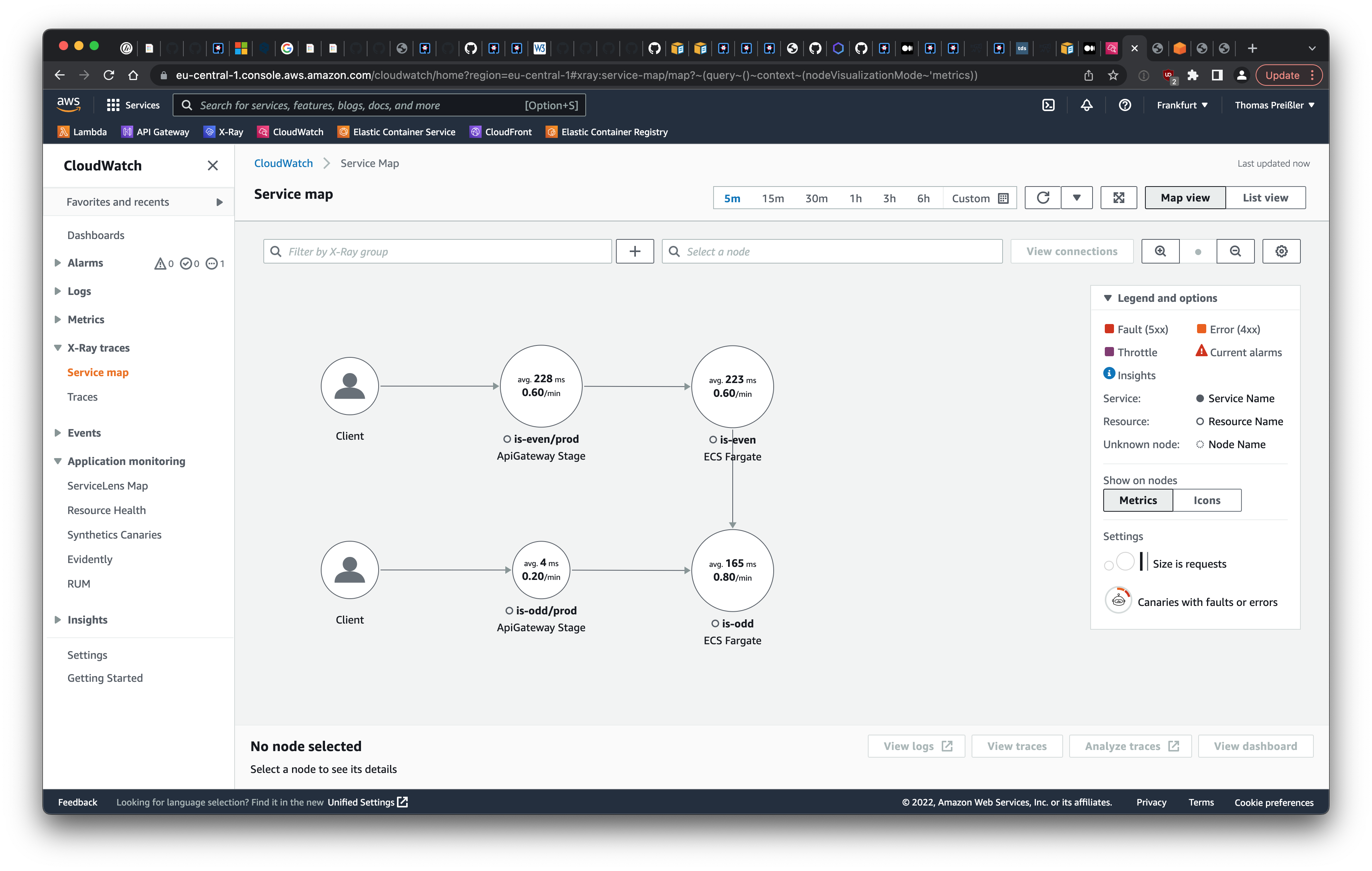
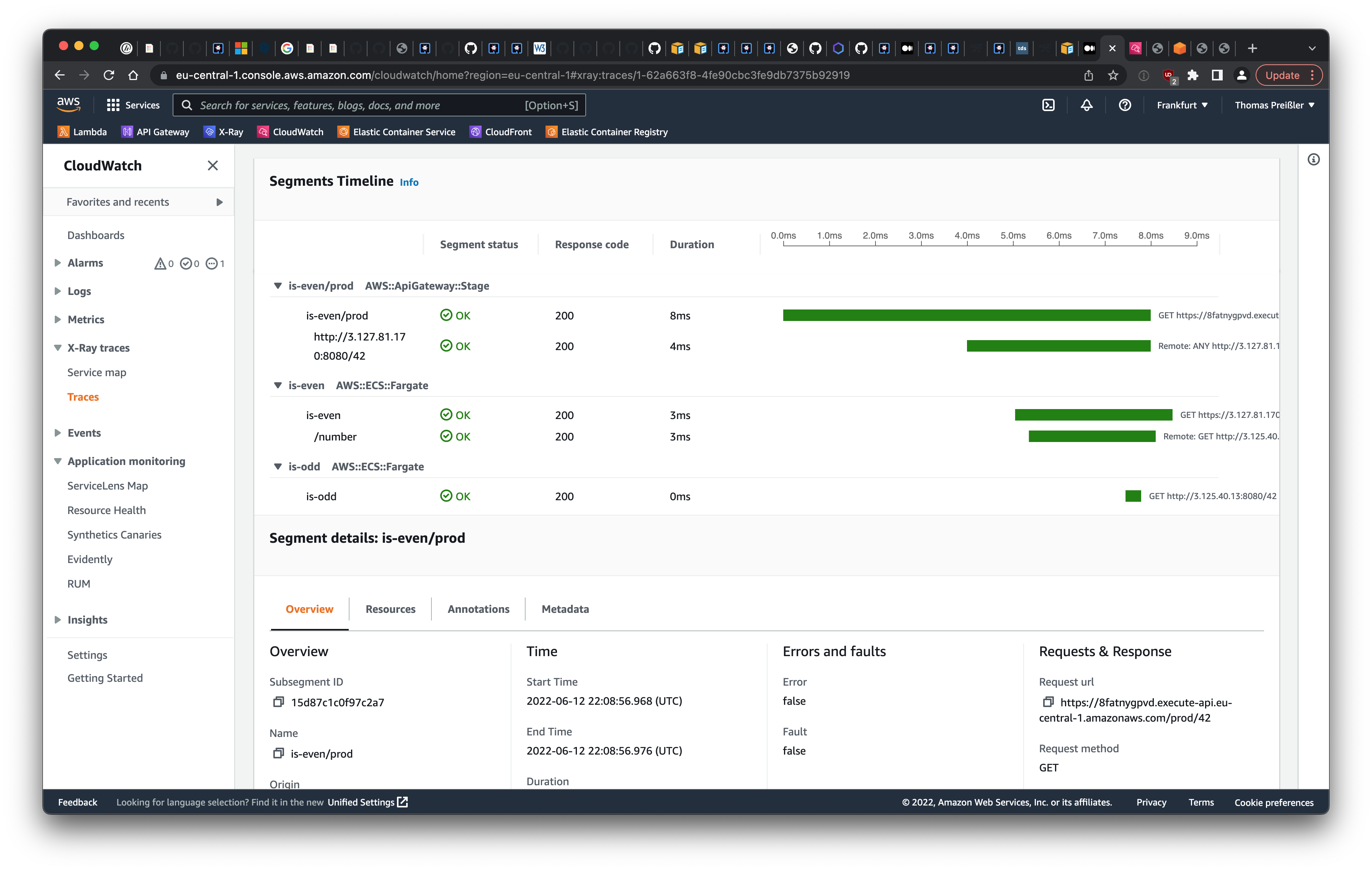
<p>The result is no surprise: both the service map and the segments timeline in CloudWatch show that the request travels from the client through the API gateway to the sample applications <code class="language-plaintext highlighter-rouge">is-even</code> and <code class="language-plaintext highlighter-rouge">is-odd</code> in AWS ECS. It can be observed that the API gateway causes the largest delay for the request shown in the screenshot, however, the overall response time of just 8 ms is pretty fast.</p>

<p><img src="/assets/images/2022-06-21/service-map.png" alt="Service map" />
<img src="/assets/images/2022-06-21/segments-timeline.png" alt="Service map" /></p>

<p>In summary, the proposed solution offers two key benefits:</p>

<ul>
  <li>Traces cover the entire microservice landscape, including self-developed applications and AWS-hosted services.</li>
  <li>There is no need to integrate a javaagent. The native executable mode of Quarkus is supported.</li>
</ul>

<p>Comments are welcome on <a href="https://twitter.com/TheThomasPr/status/1539251158287515650">Twitter</a> or <a href="https://www.linkedin.com/posts/thomas-preissler_opentelemetry-with-quarkus-to-push-distributed-activity-6945017185345970176-bHx9">LinkedIn</a>.</p>]]></content><author><name>Thomas Preißler</name></author><summary type="html"><![CDATA[Integrate OpenTelemetry into a Java Quarkus microservice to send distributed traces to AWS X-Ray. No javaagent is required and it supports the Quarkus native mode. This solution enables observation of the entire microservice infrastructure, including services hosted by AWS.]]></summary></entry><entry><title type="html">Download a file by an anchor-element only. No more Content-Disposition!</title><link href="https://thomas.preissler.me/blog/2022/05/04/download-a-file-by-an-anchor-element-only" rel="alternate" type="text/html" title="Download a file by an anchor-element only. No more Content-Disposition!" /><published>2022-05-04T06:00:00+00:00</published><updated>2022-05-04T06:00:00+00:00</updated><id>https://thomas.preissler.me/blog/2022/05/04/download-a-file-by-an-anchor-element-only</id><content type="html" xml:base="https://thomas.preissler.me/blog/2022/05/04/download-a-file-by-an-anchor-element-only"><![CDATA[<p>In the past I used the HTTP header <code class="language-plaintext highlighter-rouge">Content-Disposition</code> to instruct the browser to download a file. I ended up doing this because I knew of no other way for this.</p>

<p>Until today.</p>

<p>I discovered, that the <code class="language-plaintext highlighter-rouge">anchor</code>-element has a <code class="language-plaintext highlighter-rouge">download</code> attribute.</p>

<div class="language-html highlighter-rouge"><div class="highlight"><pre class="highlight"><code><span class="nt">&lt;a</span> <span class="na">href=</span><span class="s">"35567e83.pdf"</span> <span class="na">download=</span><span class="s">"report-2022.pdf"</span><span class="nt">&gt;</span>
  Download Report
<span class="nt">&lt;/a&gt;</span>
</code></pre></div></div>

<p>By clicking this link, the browser will download the file instead of linking to it and saves it as <code class="language-plaintext highlighter-rouge">report-2022.pdf</code>.</p>

<p>The <a href="https://caniuse.com/download">browser support</a> for this attribute is pretty good with support by all major desktop and mobile browsers.</p>

<p>More details can be found at the <a href="https://developer.mozilla.org/en-US/docs/Web/HTML/Element/a#attr-download">MDN docs</a>.</p>

<p>Comments are welcome on <a href="https://twitter.com/TheThomasPr/status/1521745346937991169">Twitter</a> or <a href="https://www.linkedin.com/posts/thomas-preissler_download-a-file-by-an-anchor-element-only-activity-6927511231180234752-D-Vz">LinkedIn</a>.</p>]]></content><author><name>Thomas Preißler</name></author><summary type="html"><![CDATA[The anchor-element has a download attribute which instructs a browser to download a file instead of linking to it.]]></summary></entry><entry><title type="html">Testing TypeScript Defintions</title><link href="https://thomas.preissler.me/blog/2022/04/27/testing-typescript-definitions" rel="alternate" type="text/html" title="Testing TypeScript Defintions" /><published>2022-04-27T16:00:00+00:00</published><updated>2022-04-27T16:00:00+00:00</updated><id>https://thomas.preissler.me/blog/2022/04/27/testing-typescript-definitions</id><content type="html" xml:base="https://thomas.preissler.me/blog/2022/04/27/testing-typescript-definitions"><![CDATA[<p>TypeScript type definitions can be quite complex. They need to be tested to avoid mistakes during implementation and refactoring.</p>

<h2 id="introducing-the-example">Introducing the Example</h2>

<p>In my last post, I showed how to use TypeScript to check translations and their usage at compile time. I would like to briefly recall this example.</p>

<p>I defined a <code class="language-plaintext highlighter-rouge">type DeepKeysOf</code>, which returns all possible nested keys from one object.</p>

<div class="language-typescript highlighter-rouge"><div class="highlight"><pre class="highlight"><code><span class="kd">type</span> <span class="nx">DeepKeysOf</span><span class="o">&lt;</span><span class="nx">T</span><span class="p">,</span> <span class="nx">Key</span> <span class="kd">extends</span> <span class="kr">keyof</span> <span class="nx">T</span> <span class="o">=</span> <span class="kr">keyof</span> <span class="nx">T</span><span class="o">&gt;</span> <span class="o">=</span> <span class="nx">Key</span> <span class="kd">extends</span> <span class="kr">string</span>
  <span class="p">?</span> <span class="nx">T</span><span class="p">[</span><span class="nx">Key</span><span class="p">]</span> <span class="kd">extends</span> <span class="kr">string</span> <span class="p">?</span> <span class="nx">Key</span> <span class="p">:</span> <span class="s2">`</span><span class="p">${</span><span class="nx">Key</span><span class="p">}</span><span class="s2">.</span><span class="p">${</span><span class="nx">DeepKeysOf</span><span class="o">&lt;</span><span class="nx">T</span><span class="p">[</span><span class="nx">Key</span><span class="p">]</span><span class="o">&gt;</span><span class="p">}</span><span class="s2">`</span>
  <span class="p">:</span> <span class="nx">never</span><span class="p">;</span>
</code></pre></div></div>

<p>If this type definition is used for the translate method now, the compiler can already point out faulty translations.</p>

<div class="language-typescript highlighter-rouge"><div class="highlight"><pre class="highlight"><code><span class="kd">const</span> <span class="nx">translation</span> <span class="o">=</span> <span class="p">{</span>
  <span class="na">dialog</span><span class="p">:</span> <span class="p">{</span>
    <span class="na">title</span><span class="p">:</span> <span class="dl">'</span><span class="s1">Bestätigung</span><span class="dl">'</span><span class="p">,</span>
    <span class="na">description</span><span class="p">:</span> <span class="dl">'</span><span class="s1">Möchten Sie fortfahren?</span><span class="dl">'</span>
  <span class="p">}</span>
<span class="p">}</span>

<span class="kd">type</span> <span class="nx">TranslationKey</span> <span class="o">=</span> <span class="nx">DeepKeysOf</span><span class="o">&lt;</span><span class="k">typeof</span> <span class="nx">translation</span><span class="o">&gt;</span><span class="p">;</span> <span class="c1">// 'dialog.title' | 'dialog.description'</span>

<span class="kd">const</span> <span class="nx">translate</span> <span class="o">=</span> <span class="p">(</span><span class="nx">translationKey</span><span class="p">:</span> <span class="nx">TranslationKey</span><span class="p">):</span> <span class="kr">string</span> <span class="o">=&gt;</span> <span class="p">{</span>
  <span class="c1">// omit the actual implementation</span>
<span class="p">}</span>

<span class="nx">translate</span><span class="p">(</span><span class="dl">'</span><span class="s1">dialog.title</span><span class="dl">'</span><span class="p">);</span> <span class="c1">// compiles fine</span>
<span class="nx">translate</span><span class="p">(</span><span class="dl">'</span><span class="s1">dialog.header</span><span class="dl">'</span><span class="p">);</span> <span class="c1">// compiler error: Argument of type '"dialog.header"' is not assignable to parameter of type 'TranslationKey'.</span>
</code></pre></div></div>

<p>The full example with more detailed explanations can be found in my <a href="/blog/2022/03/30/using-typescript-to-validate-translations-at-compile-time">previous post</a> or in this <a href="https://www.typescriptlang.org/play?#code/PTAEFUGcEsDsHNQBUCeAHAppAxgJ2mgC6iED2oAbgIYA20AJlYRiblbJDU9KR6E6GykAtmmg0WhaMIwAoEKAAWhQmkgAuEIUUiqkAHRpcGaJE4Zc+mcABGNUvGAAmAAxOnwFwGZgXl8ABXGAQAWkJ0LDwCQjDSEOo6RmYwtg4uKV5IEKYQoVFxDDDpOVkhDmJCVM5uXlAAXlAAb1lQJQwaewB1UlwaenVQAHIACVp7UE72wgBCQYAaFtB6aFoHAebW1qlCCQHBgCEsQgATqXgAhHnF1vpI-CIeWD2AWQA37GUMWFAAZWgWABmPUIAKoimMsAA-INFgBfBatKjYDIcdbXUA2AIqTJozabSABGzCaCEPaHSAnM5fK541rYdjYdp7ACCNhsxg+1PRsLhsh5snCmFAABEMBg0ABpDAoSAAeQBAB4kHNQFKUKAMAAPZiweiQUAAa2lpAByHqhuNpqQAD56ui1RrtV89aAKfgEOjIcgANpqgC6jp1LrdcEQXodAwABgASRpq2H6WOi8VquWKpC+6V+62wyPogawDAUCyyAURZBVdKPB0NZOS6VphWCjAm1jsaoo60AblLzd+lVDstgNBQAClILUGiGEKAAD5NUDeoykTC4cIDafwP0DH4DhBDkfj2qwnulTIVStMFgNAAUlXbVd4aoGSEvKLVAEoN3vEHVbRtNjKClQGMAkaGIBp7zSGpYDVdE8X0SA0DoQgbwAIn0NCP3gzZ9GMegAkZG8cNpUAbwAKwnWAVWXVdwgAOSoGQP3qW1m1bSjJzqBpBlIGxyIwZFBlAL1ONgJdcBXCwGKYjAAwGC5bgBOAMHoBFSNpKCO0efh9V3d14APMcqLnUBFIwZTC3oD8ezxYxCACXBvnY01QICcD6m4oZN2Er03I8gYtMfWDpR7E9ezfDAb0GZZVngfRtgkQYbIFSLoti+x4sUDAqFuXBkp7IA">TypeScript Playground</a>.</p>

<h2 id="testing">Testing</h2>

<p>Looking at the implementation, some issues stand out that need to be addressed:</p>

<ul>
  <li>The definition is quite complex and not obvious at first sight.</li>
  <li>Check if the implementation works as expected, in the good case as well as in the bad case.</li>
  <li>Refactorings should not lead to new errors.</li>
  <li>Document the use of <code class="language-plaintext highlighter-rouge">DeepKeysOf</code>.</li>
</ul>

<p>All these points apply in general to any code, not only to type definitions. The key is to write unit tests. And this is exactly what I want to do for TypeScript’s type definitions.</p>

<p>The big difference to usual unit tests is that type definitions exist only at compile time. This implies that the tests also have to be executed by the compiler rather than at runtime like all other unit tests. This sounds complicated, but is actually fairly easy. In the following I want to briefly introduce the possibilities with <code class="language-plaintext highlighter-rouge">ts-expect-error</code> and <code class="language-plaintext highlighter-rouge">expect-type</code>.</p>

<h3 id="ts-expect-error">ts-expect-error</h3>

<p><code class="language-plaintext highlighter-rouge">ts-excpect-error</code> was introduces with <a href="https://www.typescriptlang.org/docs/handbook/release-notes/typescript-3-9.html#-ts-expect-error-comments">TypeScript 3.9</a>. This instructs TypeScript to expect a compiler error on the following line. If a line is preceded by a <code class="language-plaintext highlighter-rouge">// @ts-expect-error</code> comment, TypeScript suppresses the reporting of this error; but if there is no error, TypeScript reports that <code class="language-plaintext highlighter-rouge">// @ts-expect-error</code> was not necessary.</p>

<div class="language-typescript highlighter-rouge"><div class="highlight"><pre class="highlight"><code><span class="nx">translate</span><span class="p">(</span><span class="dl">'</span><span class="s1">dialog.title</span><span class="dl">'</span><span class="p">);</span>

<span class="c1">// @ts-expect-error</span>
<span class="nx">translate</span><span class="p">(</span><span class="dl">'</span><span class="s1">dialog.header</span><span class="dl">'</span><span class="p">);</span>
</code></pre></div></div>

<p>The actual type definition of <code class="language-plaintext highlighter-rouge">DeepKeysOf</code> can be tested without using the <code class="language-plaintext highlighter-rouge">translate</code> method:</p>

<div class="language-typescript highlighter-rouge"><div class="highlight"><pre class="highlight"><code><span class="c1">// @ts-expect-error</span>
<span class="kd">const</span> <span class="nx">invalidKey</span><span class="p">:</span> <span class="nx">DeepKeysOf</span><span class="o">&lt;</span><span class="k">typeof</span> <span class="nx">translation</span><span class="o">&gt;</span> <span class="o">=</span> <span class="dl">'</span><span class="s1">dialog.header</span><span class="dl">'</span><span class="p">;</span>
</code></pre></div></div>

<p>A complete example can be found at <a href="https://www.typescriptlang.org/play?#code/PTAEBUFMGcBcEsB2BzCBPADpAygYwE7waygAikAZkvAgPaLQBQIoAFrLBtAFwiyu0AtgENoAOgz5I8aNAA2kfGMGRgAIzm1kwAEwAGHTuB6ALLoBswWDAQoAtLEwwCRWHYAmlanQaNGuejhQWHxhBjlhH1AAXlAAb0ZQNkg5TQB1Wnw5d25QAHIACWFU2lA0lNgAQjyAGkTQd3hirVyEpKSEWAVcvIAhGwAThGQAVxRa+qTPaBdieHoegFkAN9x2SERQbHhIUApM2AphVilEAH48+oBfOqThXB8eeMnQNRGOQNaXpOgRtUEaD1+nAhvBkBsJu12rgwrgUj0AIJqNRSNYQl5Xa6MTGMRxYMiQSAYADSkDQ0AA8hQADzgGqgUloUCQAAe1kQ7mgoAA1mTaBQIDEeXyBeAAHwxF6M5lsjac0BwQgoF5nCAAbUZAF0Zez5YqkKhVdLcgADAAkcUZVzEFvIRMZlJp4A1ZM1YquJpeuUQkAAboo-HjduBQuFIvNENLYnaSWTHdSg-zgqH5OH6GKANyBpxbEIGimIORoABS0HoQv1KFAAB94qA1ZJaFh8I5cpXkJrctg8ygC0XS+Wrln-IESCEwqnrEKABTjsM+Rm5EMTiILskASjbPdQ0QlbWho9AUl+chIsTnk4jjO+7TE0Awcho04ARGJn+ub0kxFJ3CM4dPPyhUBpwAKzLRB6UbZtHAAOWEFR1xiCVEwFMDy2iDD8loNQQMgB48lAVU0MQBt8CbRRYPgyBtVyMZPCoH13FuICWIvVcI1AURcyVZA+xLcCa1AOivEY9csyhKRYBGfBNhQo8YBGU8YkwvJ2wI1Vj0UkhcjYtNIzJLMhz8XEU1XSBpzyRpmmQMROgUPIxOYMAAAFYGgOxWSwB4PPwMj8BMldInMyymk0GzWEgYRPHwBzhwCBgSF9Yp4HcRcCXtOMqQTJwk10nwJViELrNsmh7KzFhXPczy8LcRQ-JHBLQCQJLH1SslchjB0srkvKIwK-IrLCsQIqixQ8izIA">TypeScript Playground</a>.</p>

<p>This is a very simple approach and can be used without additional libraries. However, the solution is not very verbose, in unit test usually the expected result is explicitly given.</p>

<h3 id="expect-type">expect-type</h3>

<p><a href="https://www.npmjs.com/package/expect-type">expect-type</a> is a library developed for exactly this purpose: Testing type definitions.</p>

<div class="language-typescript highlighter-rouge"><div class="highlight"><pre class="highlight"><code><span class="kd">const</span> <span class="nx">translation</span> <span class="o">=</span> <span class="p">{</span>
  <span class="na">dialog</span><span class="p">:</span> <span class="p">{</span>
    <span class="na">title</span><span class="p">:</span> <span class="dl">'</span><span class="s1">Bestätigung</span><span class="dl">'</span><span class="p">,</span>
    <span class="na">description</span><span class="p">:</span> <span class="dl">'</span><span class="s1">Möchten Sie fortfahren?</span><span class="dl">'</span>
  <span class="p">}</span>
<span class="p">}</span>

<span class="kd">type</span> <span class="nx">TranslationKey</span> <span class="o">=</span> <span class="nx">DeepKeysOf</span><span class="o">&lt;</span><span class="k">typeof</span> <span class="nx">translation</span><span class="o">&gt;</span><span class="p">;</span>

<span class="nx">expectTypeOf</span><span class="o">&lt;</span><span class="dl">'</span><span class="s1">dialog.title</span><span class="dl">'</span><span class="o">&gt;</span><span class="p">().</span><span class="nx">toMatchTypeOf</span><span class="o">&lt;</span><span class="nx">TranslationKey</span><span class="o">&gt;</span><span class="p">();</span>
<span class="nx">expectTypeOf</span><span class="o">&lt;</span><span class="dl">'</span><span class="s1">dialog.header</span><span class="dl">'</span><span class="o">&gt;</span><span class="p">().</span><span class="nx">not</span><span class="p">.</span><span class="nx">toMatchTypeOf</span><span class="o">&lt;</span><span class="nx">TranslationKey</span><span class="o">&gt;</span><span class="p">();</span>
</code></pre></div></div>

<p>In my opinion <code class="language-plaintext highlighter-rouge">expectTypeOf</code> is a very smart solution, but it adds another dependency to the project.</p>

<p>Comments are welcome on <a href="https://twitter.com/TheThomasPr/status/1519349400753082369">Twitter</a> or <a href="https://www.linkedin.com/posts/thomas-preissler_testing-typescript-defintions-activity-6925115513165545472-HQhI">LinkedIn</a>.</p>]]></content><author><name>Thomas Preißler</name></author><summary type="html"><![CDATA[TypeScript type definitions can be quite complex. They need to be tested to avoid mistakes during implementation and refactoring.]]></summary></entry><entry><title type="html">Using TypeScript to validate translations at compile time</title><link href="https://thomas.preissler.me/blog/2022/03/30/using-typescript-to-validate-translations-at-compile-time" rel="alternate" type="text/html" title="Using TypeScript to validate translations at compile time" /><published>2022-03-30T19:36:32+00:00</published><updated>2022-03-30T19:36:32+00:00</updated><id>https://thomas.preissler.me/blog/2022/03/30/using-typescript-to-validate-translations-at-compile-time</id><content type="html" xml:base="https://thomas.preissler.me/blog/2022/03/30/using-typescript-to-validate-translations-at-compile-time"><![CDATA[<p>In web applications as I know them, translations are mostly stored in JSONish format and accessed at runtime. Usually, the setup is more complex since the applications needs to support multiple translations. But for now let’s keep it as simple as possible.</p>

<div class="language-typescript highlighter-rouge"><div class="highlight"><pre class="highlight"><code><span class="kd">const</span> <span class="nx">translation</span> <span class="o">=</span> <span class="p">{</span>
  <span class="na">helloWorld</span><span class="p">:</span> <span class="dl">'</span><span class="s1">Hallo Welt!</span><span class="dl">'</span><span class="p">,</span>
  <span class="na">dialog</span><span class="p">:</span> <span class="p">{</span>
    <span class="na">title</span><span class="p">:</span> <span class="dl">'</span><span class="s1">Bestätigung</span><span class="dl">'</span><span class="p">,</span>
    <span class="na">description</span><span class="p">:</span> <span class="dl">'</span><span class="s1">Möchten Sie fortfahren?</span><span class="dl">'</span>
  <span class="p">},</span>
  <span class="na">actions</span><span class="p">:</span> <span class="p">{</span>
    <span class="na">buttons</span><span class="p">:</span> <span class="p">{</span>
      <span class="na">submit</span><span class="p">:</span> <span class="dl">'</span><span class="s1">Bestätigen</span><span class="dl">'</span><span class="p">,</span>
      <span class="na">cancel</span><span class="p">:</span> <span class="dl">'</span><span class="s1">Abbrechen</span><span class="dl">'</span>
    <span class="p">}</span>
  <span class="p">}</span>
<span class="p">}</span>
</code></pre></div></div>

<p>To retrieve and display the translation at runtime there is a method called <code class="language-plaintext highlighter-rouge">translate</code> which returns the corresponding translation for a key from the translation object:</p>

<div class="language-typescript highlighter-rouge"><div class="highlight"><pre class="highlight"><code><span class="kd">type</span> <span class="nx">StringOnlyJson</span> <span class="o">=</span> <span class="kr">string</span> <span class="o">|</span> <span class="p">{</span> <span class="p">[</span><span class="na">property</span><span class="p">:</span> <span class="kr">string</span><span class="p">]:</span> <span class="nx">StringOnlyJson</span> <span class="p">};</span>

<span class="kd">const</span> <span class="nx">translate</span> <span class="o">=</span> <span class="p">(</span><span class="nx">translationKey</span><span class="p">:</span> <span class="kr">string</span><span class="p">):</span> <span class="kr">string</span> <span class="o">=&gt;</span> <span class="p">{</span>
  <span class="kd">const</span> <span class="nx">result</span> <span class="o">=</span> <span class="nx">translationKey</span>
    <span class="p">.</span><span class="nx">split</span><span class="p">(</span><span class="dl">'</span><span class="s1">.</span><span class="dl">'</span><span class="p">)</span>
    <span class="p">.</span><span class="nx">reduce</span><span class="p">(</span>
      <span class="p">(</span><span class="nx">json</span><span class="p">,</span> <span class="nx">propertyName</span><span class="p">)</span> <span class="o">=&gt;</span> <span class="k">typeof</span> <span class="nx">json</span> <span class="o">===</span> <span class="dl">'</span><span class="s1">object</span><span class="dl">'</span> <span class="p">?</span> <span class="nx">json</span><span class="p">[</span><span class="nx">propertyName</span><span class="p">]</span> <span class="p">:</span> <span class="kc">undefined</span><span class="p">,</span>
      <span class="nx">translation</span> <span class="k">as</span> <span class="nx">StringOnlyJson</span> <span class="o">|</span> <span class="kc">undefined</span>
    <span class="p">);</span>
  <span class="k">return</span> <span class="k">typeof</span> <span class="nx">result</span> <span class="o">===</span> <span class="dl">'</span><span class="s1">string</span><span class="dl">'</span> <span class="p">?</span> <span class="nx">result</span> <span class="p">:</span> <span class="nx">translationKey</span><span class="p">;</span>
<span class="p">};</span>
</code></pre></div></div>

<p>If the method gets called with <code class="language-plaintext highlighter-rouge">dialog.title</code>, it will return <code class="language-plaintext highlighter-rouge">Bestätigung</code>:</p>

<div class="language-typescript highlighter-rouge"><div class="highlight"><pre class="highlight"><code><span class="nx">translate</span><span class="p">(</span><span class="dl">'</span><span class="s1">dialog.title</span><span class="dl">'</span><span class="p">);</span> <span class="c1">// returns 'Bestätigung'</span>
</code></pre></div></div>

<p>But what happens if an invalid or incorrect translation key is passed to the method? The method cannot find the corresponding translation and returns the passed key as a fallback. In the following example <code class="language-plaintext highlighter-rouge">dialog.header</code> is passed instead of <code class="language-plaintext highlighter-rouge">dialog.title</code>.</p>

<div class="language-typescript highlighter-rouge"><div class="highlight"><pre class="highlight"><code><span class="nx">translate</span><span class="p">(</span><span class="dl">'</span><span class="s1">dialog.header</span><span class="dl">'</span><span class="p">);</span> <span class="c1">// returns 'dialog.header'</span>
</code></pre></div></div>

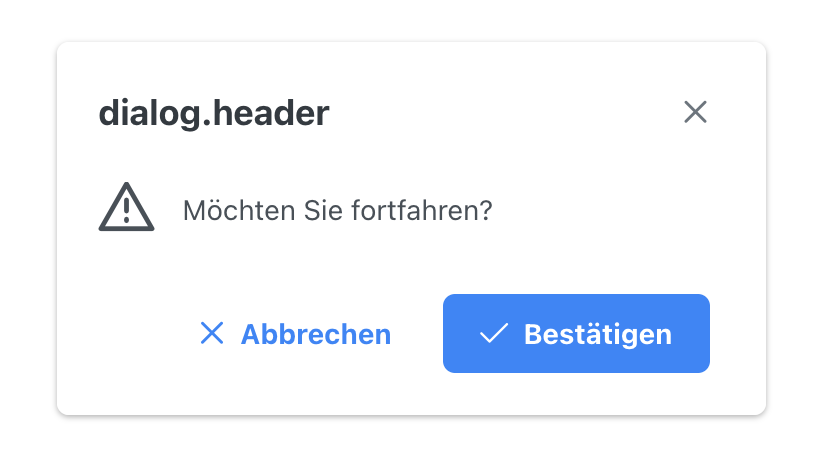
<p>In my experience this error pattern occurs quite often. A developer simply makes a typo in the translations or changes the naming of a translation key without adjusting them at each source code location. This results in the user seeing only the technical key instead of the expected translation. Such a fallback is helpful because the user can likely continue working with the application instead of getting a blank label or even worse an error message.</p>

<p><img src="/assets/images/2022-03-30/dialog.png" alt="Dialog with missing translation" /></p>

<p>As mentioned at the beginning, translations are usually loaded at runtime. Therefore, such errors do not occur earlier than at runtime. To detect and avoid such defects, an extensive test suite or a high manual testing effort is required. In worst case, such defects occur in production and are displayed to the end user.</p>

<p>For this reason, errors should be found as early as possible and that is usually at compile time.</p>

<p>Wouldn’t it be great if the translation keys could be checked automatically? Let’s jump into the power of TypeScript.</p>

<p>In TypeScript there are these String Literal Types. Isn’t it possible to check the translation keys at compile time and inform the developer about his mistake? It would only need a list of all possible translation keys. That is worth a try:</p>

<div class="language-typescript highlighter-rouge"><div class="highlight"><pre class="highlight"><code><span class="kd">type</span> <span class="nx">TranslationKey</span> <span class="o">=</span>
  <span class="o">|</span> <span class="dl">'</span><span class="s1">helloWorld</span><span class="dl">'</span>
  <span class="o">|</span> <span class="dl">'</span><span class="s1">dialog.title</span><span class="dl">'</span>
  <span class="o">|</span> <span class="dl">'</span><span class="s1">dialog.description</span><span class="dl">'</span>
  <span class="o">|</span> <span class="dl">'</span><span class="s1">actions.buttons.submit</span><span class="dl">'</span>
  <span class="o">|</span> <span class="dl">'</span><span class="s1">actions.buttons.cancel</span><span class="dl">'</span><span class="p">;</span>
</code></pre></div></div>

<p>Afterwards the signature of the <code class="language-plaintext highlighter-rouge">translate</code> method can be changed to use the type <code class="language-plaintext highlighter-rouge">TranslationKey</code> for the <code class="language-plaintext highlighter-rouge">translationKey</code> parameter instead of just <code class="language-plaintext highlighter-rouge">string</code>:</p>

<div class="language-typescript highlighter-rouge"><div class="highlight"><pre class="highlight"><code><span class="kd">const</span> <span class="nx">translate</span> <span class="o">=</span> <span class="p">(</span><span class="nx">translationKey</span><span class="p">:</span> <span class="nx">TranslationKey</span><span class="p">):</span> <span class="kr">string</span> <span class="o">=&gt;</span> <span class="p">{</span>
  <span class="c1">// same code as above</span>
<span class="p">};</span>
</code></pre></div></div>

<p>This change leads to the fact that the method <code class="language-plaintext highlighter-rouge">translate</code> must only be called with one of the previously defined values. All other strings are treated as errors by the compiler.</p>

<p>Back to the example from above. What happens if the <code class="language-plaintext highlighter-rouge">translate</code> method gets called with the correct <code class="language-plaintext highlighter-rouge">dialog.title</code> and the incorrect <code class="language-plaintext highlighter-rouge">dialog.header</code>?</p>

<div class="language-typescript highlighter-rouge"><div class="highlight"><pre class="highlight"><code><span class="nx">translate</span><span class="p">(</span><span class="dl">'</span><span class="s1">dialog.title</span><span class="dl">'</span><span class="p">);</span> <span class="c1">// compiles fine</span>
<span class="nx">translate</span><span class="p">(</span><span class="dl">'</span><span class="s1">dialog.header</span><span class="dl">'</span><span class="p">);</span> <span class="c1">// compiler error: Argument of type '"dialog.header"' is not assignable to parameter of type 'TranslationKey'.</span>
</code></pre></div></div>

<p>The compiler gives an error message on the second call. The program does not compile and the developer is forced to correct the mistake.</p>

<p>This solution works very well and is easy to implement. Problem solved. :-)</p>

<p>Well…</p>

<p>This solution requires the developer to maintain all translation keys twice: once in the actual translation and a second time in the definition of the <code class="language-plaintext highlighter-rouge">TranslationKey</code> type. These two definitions must always be kept in sync to avoid the above mentioned errors of missing translations. This process is tedious, error-prone and in the end does not lead to any improvement.</p>

<p>Is there no way to create the <code class="language-plaintext highlighter-rouge">TranslationKey</code> type automatically? The TypeScript compiler would only have to extract the translation keys from the JSON object and concatenate them with a dot.</p>

<p>Indeed, TypeScript can derive the <code class="language-plaintext highlighter-rouge">TranslationKey</code>!</p>

<div class="language-typescript highlighter-rouge"><div class="highlight"><pre class="highlight"><code><span class="kd">type</span> <span class="nx">DeepKeysOf</span><span class="o">&lt;</span><span class="nx">T</span><span class="p">,</span> <span class="nx">Key</span> <span class="kd">extends</span> <span class="kr">keyof</span> <span class="nx">T</span> <span class="o">=</span> <span class="kr">keyof</span> <span class="nx">T</span><span class="o">&gt;</span> <span class="o">=</span> <span class="nx">Key</span> <span class="kd">extends</span> <span class="kr">string</span>
  <span class="p">?</span> <span class="nx">T</span><span class="p">[</span><span class="nx">Key</span><span class="p">]</span> <span class="kd">extends</span> <span class="kr">string</span> <span class="p">?</span> <span class="nx">Key</span> <span class="p">:</span> <span class="s2">`</span><span class="p">${</span><span class="nx">Key</span><span class="p">}</span><span class="s2">.</span><span class="p">${</span><span class="nx">DeepKeysOf</span><span class="o">&lt;</span><span class="nx">T</span><span class="p">[</span><span class="nx">Key</span><span class="p">]</span><span class="o">&gt;</span><span class="p">}</span><span class="s2">`</span>
  <span class="p">:</span> <span class="nx">never</span><span class="p">;</span>

<span class="kd">type</span> <span class="nx">TranslationKey</span> <span class="o">=</span> <span class="nx">DeepKeysOf</span><span class="o">&lt;</span><span class="k">typeof</span> <span class="nx">translation</span><span class="o">&gt;</span><span class="p">;</span>
</code></pre></div></div>

<p>The type <code class="language-plaintext highlighter-rouge">TranslationKey</code> is identical to the manual definition from above. The behavior of the compiler is as well identical, a call to the <code class="language-plaintext highlighter-rouge">translate</code> method with an incorrect translation key will raise an error.</p>

<p>But what exactly does the <code class="language-plaintext highlighter-rouge">DeepKeysOf</code> type do? Let’s look at the crucial part first:</p>

<div class="language-typescript highlighter-rouge"><div class="highlight"><pre class="highlight"><code><span class="nx">T</span><span class="p">[</span><span class="nx">Key</span><span class="p">]</span> <span class="kd">extends</span> <span class="kr">string</span> <span class="p">?</span> <span class="nx">Key</span> <span class="p">:</span> <span class="s2">`</span><span class="p">${</span><span class="nx">Key</span><span class="p">}</span><span class="s2">.</span><span class="p">${</span><span class="nx">DeepKeysOf</span><span class="o">&lt;</span><span class="nx">T</span><span class="p">[</span><span class="nx">Key</span><span class="p">]</span><span class="o">&gt;</span><span class="p">}</span><span class="s2">`</span>
</code></pre></div></div>

<p><code class="language-plaintext highlighter-rouge">T</code> is the type definition of the translation object, <code class="language-plaintext highlighter-rouge">Key</code> is a property of the translation object, <code class="language-plaintext highlighter-rouge">T[Key]</code> is therefore the value of this property. <code class="language-plaintext highlighter-rouge">T[Key]</code> can be either a <code class="language-plaintext highlighter-rouge">string</code>, like <code class="language-plaintext highlighter-rouge">'Hello World!'</code> or another object, like the value of <code class="language-plaintext highlighter-rouge">dialog</code>. In the first case, the execution can be stopped and the result is simply <code class="language-plaintext highlighter-rouge">helloWorld</code>. In the second case a recursion is called, which adds <code class="language-plaintext highlighter-rouge">.</code> to the <code class="language-plaintext highlighter-rouge">Key</code> and again uses the type definition <code class="language-plaintext highlighter-rouge">DeepKeysOf</code> for the object of <code class="language-plaintext highlighter-rouge">T[Key]</code>. With the help of this recursion it is possible to use arbitrarily deeply nested translation objects.</p>

<p>A practical example for <code class="language-plaintext highlighter-rouge">DeepKeysOf&lt;typeof translation&gt;</code>: <code class="language-plaintext highlighter-rouge">T</code> is the entire translation object, <code class="language-plaintext highlighter-rouge">Key</code> is a property of this, i.e. <code class="language-plaintext highlighter-rouge">helloWorld</code>, <code class="language-plaintext highlighter-rouge">dialog</code> or <code class="language-plaintext highlighter-rouge">action</code>. <code class="language-plaintext highlighter-rouge">T[Key]</code> is the value of this property, for the <code class="language-plaintext highlighter-rouge">Key</code> <code class="language-plaintext highlighter-rouge">helloWorld</code> it is <code class="language-plaintext highlighter-rouge">'Hello World!'</code> , for <code class="language-plaintext highlighter-rouge">dialog</code> it is the object <code class="language-plaintext highlighter-rouge">{ title: 'Bestätigung', description: 'Möchten Sie fortfahren?' }</code>. Thus, if <code class="language-plaintext highlighter-rouge">Key</code> is <code class="language-plaintext highlighter-rouge">helloWorld</code> then the expression <code class="language-plaintext highlighter-rouge">T[Key] extends string</code> holds true and thus the result of the expression will be <code class="language-plaintext highlighter-rouge">helloWorld</code>. On the other hand, if <code class="language-plaintext highlighter-rouge">Key</code> is <code class="language-plaintext highlighter-rouge">dialog</code>, then <code class="language-plaintext highlighter-rouge">T[Key]</code> is an object, the expression holds false, and the result is a concatenation of <code class="language-plaintext highlighter-rouge">dialog.</code> (including the dot) with the result of <code class="language-plaintext highlighter-rouge">DeepKeysOf&lt;T['dialog']&gt;</code>.</p>

<p>However, it still has to be clarified how to iterate through the different properties within an object. For this purpose <code class="language-plaintext highlighter-rouge">keyof</code> and a type alias named <code class="language-plaintext highlighter-rouge">Key</code> is used: <code class="language-plaintext highlighter-rouge">Key extends keyof T = keyof T</code>. <code class="language-plaintext highlighter-rouge">keyof T</code> is an alias for all properties of the object <code class="language-plaintext highlighter-rouge">T</code> and allows in that way an iteration through all properties. <code class="language-plaintext highlighter-rouge">Key</code> then contains the current property selected by the iteration through <code class="language-plaintext highlighter-rouge">keyof T</code>. The actual iteration is performed by TypeScript itself.</p>

<p>As a last point there is the wrapper <code class="language-plaintext highlighter-rouge">Key extends string ? ... : never</code> around the actual expression (abbreviated by …). In the translation object <code class="language-plaintext highlighter-rouge">Key</code> is always a <code class="language-plaintext highlighter-rouge">string</code>, so this expression is actually not relevant. But TypeScript does not actually know this, because this has not been defined. But for the later concatenation with <code class="language-plaintext highlighter-rouge">.</code> TypeScript expects a <code class="language-plaintext highlighter-rouge">string</code> (or several other types). By the way, the else branch with the result <code class="language-plaintext highlighter-rouge">never</code> is not called with the translation object. But if the object would contain some keys which are not <code class="language-plaintext highlighter-rouge">string</code> (i.e. <code class="language-plaintext highlighter-rouge">number</code>, or similar), then using <code class="language-plaintext highlighter-rouge">never</code> the corresponding invalid branches in the input object would be ignored.</p>

<p>This entire implementation is also available for simple follow up on the <a href="https://www.typescriptlang.org/play?#code/PTAEFUGcEsDsHNQBUCeAHAppAxgJ2mgC6iED2oAbgIYA20AJlYRiblbJDU9KR6E6GykAtmmg0WhaMIwAoEKAAWhQmkgAuEIUUiqkAHRpcGaJE4Zc+mcABGNUvGAAmAAxOnwFwGZgXl8ABXGAQAWkJ0LDwCQjDSEOo6RmYwtg4uKV5IEKYQoVFxDDDpOVkhDmJCVM5uXlAAXlAAb1lQJQwaewB1UlwaenVQAHIACVp7UE72wgBCQYAaFtB6aFoHAebW1qlCCQHBgCEsQgATqXgAhHnF1vpI-CIeWD2AWQA37GUMWFAAZWgWABmPUIAKoimMsAA-INFgBfBatKjYDIcdbXUA2AIqTJozabSABGzCaCEPaHSAnM5fK541rYdjYdp7ACCNhsxg+1PRsLhsh5snCmFAABEMBg0ABpDAoSAAeQBAB4kHNQFKUKAMAAPZiweiQUAAa2lpAByHqhuNpqQAD56ui1RrtV89aAKfgEOjIcgANpqgC6jp1LrdcEQXodAwABgASRpq2H6WOi8VquWKpC+6V+62wyPogawDAUCyyAURZBVdKPB0NZOS6VphWCjAm1jsaoo60AblLzd+lVDstgNBQAClILUGiGEKAAD5NUDeoykTC4cIDafwP0DH4DhBDkfj2qwnulTIVStMFgNAAUlXbVd4aoGSEvKLVAEoN3vEHVbRtNjKClQGMAkaGIBp7zSGpYDVdE8X0SA0DoQgbwAIn0NCP3gzZ9GMegAkZG8cNpUAbwAKwnWAVWXVdwgAOSoGQP3qW1m1bSjJzqBpBlIGxyIwZFBlAL1ONgJdcBXCwGKYjAAwGC5bgBOAMHoBFSNpKCO0efh9V3d14APMcqLnUBFIwZTC3oD8ezxYxCACXBvnY01QICcD6m4oZN2Er03I8gYtMfWDpR7E9ezfDAb0GZZVngfRtgkQYbIFSLoti+x4sUDAqFuXBkp7IA">TypeScript Playground</a>.</p>

<p>In the end, this solution is very powerful, thanks to TypeScript’s extensive type system. Translations are no longer as error-prone as I know from my past. Overall, a single type definition increases the quality of the software and this quality can also be checked automatically at compile-time.</p>

<p>Comments are welcome on <a href="https://twitter.com/TheThomasPr/status/1509516711434895364">Twitter</a> or <a href="https://www.linkedin.com/posts/thomas-preissler_using-typescript-to-validate-translations-activity-6915282669471698944-PGmU">LinkedIn</a>.</p>]]></content><author><name>Thomas Preißler</name></author><summary type="html"><![CDATA[Translations stored in JSON can be validated at compile time with a TypeScript type definition to avoid runtime errors.]]></summary></entry><entry><title type="html">Implementing a timeline with scrolling and zooming - or how I failed at elementary school math</title><link href="https://thomas.preissler.me/blog/2022/01/10/implementing-a-timeline-with-scrolling-and-zooming-or-how-i-failed-at-elementary-school-math" rel="alternate" type="text/html" title="Implementing a timeline with scrolling and zooming - or how I failed at elementary school math" /><published>2022-01-10T20:18:32+00:00</published><updated>2022-01-10T20:18:32+00:00</updated><id>https://thomas.preissler.me/blog/2022/01/10/implementing-a-timeline-with-scrolling-and-zooming-or-how-i-failed-at-elementary-school-math</id><content type="html" xml:base="https://thomas.preissler.me/blog/2022/01/10/implementing-a-timeline-with-scrolling-and-zooming-or-how-i-failed-at-elementary-school-math"><![CDATA[<p>Recently I had the task of implementing a timeline. Not a big deal? You’re probably right, it’s just a bit of Flexbox magic. But there are three challenges:</p>

<ul>
  <li>The events in the timeline are not equally distributed and the space between the events need to follow that.</li>
  <li>Since the timeline might contain a huge amount of events, a user needs to be able to zoom into the timeline.</li>
  <li>If the full timeline is not visible anymore, the user needs to be able to scroll left and right by grabbing the timeline.</li>
</ul>

<p>I’ll omit any labels or fancy details and focus on the main challenges only.</p>

<ol>
  <li><a href="#fully-working-example">Fully working example</a></li>
  <li><a href="#easy-peasy-the-flexbox-magic">Easy Peasy - the Flexbox magic</a></li>
  <li><a href="#scrolling">Scrolling</a></li>
  <li><a href="#zooming-first-attempt">Zooming first attempt</a></li>
  <li><a href="#fix-the-calculations">Fix the calculations</a></li>
</ol>

<h2 id="fully-working-example">Fully working example</h2>

<p>First, let’s take a look at the fully working example. It will give a better impression of the solution than the dry list of requirements.</p>

<p>Use the mouse wheel to scroll in and out. Grab the timeline to move it left and right.</p>

<iframe src="https://thomas.preissler.me/timeline/" width="100%" style="border: 0; height: 104px; margin-bottom: 1.3rem;"></iframe>

<p>It’s implemented with pure HTML, CSS and JavaScript without a single dependency. 😇</p>

<p>You can find the full source code on <a href="https://github.com/ThomasPr/timeline">Github</a>.</p>

<h2 id="easy-peasy-the-flexbox-magic">Easy Peasy - the Flexbox magic</h2>

<p>Let’s get started: A simple timeline requires only very few lines of CSS. It fills the whole screen and rescales well for different screen sizes. It employs a simple Flexbox layout with a <code class="language-plaintext highlighter-rouge">flex-direction: row</code> to keep the events in a row. But the events should not be distributed evenly, the space between them should differ and be customizable.</p>

<p>Thanks to Flexbox it’s quite simple: Just put a <code class="language-plaintext highlighter-rouge">div</code> between the events that has a <code class="language-plaintext highlighter-rouge">flex-grow</code> property. A <code class="language-plaintext highlighter-rouge">div</code> with <code class="language-plaintext highlighter-rouge">flex-grow: 8</code> will get four times the space of a <code class="language-plaintext highlighter-rouge">flex-grow: 2</code>. The browser will then scale the size between the events accordingly to the <code class="language-plaintext highlighter-rouge">flex-grow</code> property. To put this abstract property to the timeline we can assume that the number of days between two events is set to the <code class="language-plaintext highlighter-rouge">flex-grow</code> property, e. g. if two events are 30 days apart, we would use <code class="language-plaintext highlighter-rouge">flex-grow: 30</code>. Easy peasy, right? I cannot image how painful an implemention would look like without the power of Flexbox.</p>

<p>The result looks quite good. And yet, it wasn’t a challenge to make it happen. So far, there is no reason for a longish blog post like this. But the task will get much harder in the next section. Be warned!</p>

<p>For now the <code class="language-plaintext highlighter-rouge">scrollable</code> and <code class="language-plaintext highlighter-rouge">zoomable</code> classes are needless, but they will get important very soon. I want to drop the full HTML and CSS here so that I don’t need to paste it later on again.</p>

<div class="language-html highlighter-rouge"><div class="highlight"><pre class="highlight"><code><span class="nt">&lt;div</span> <span class="na">class=</span><span class="s">"scrollable"</span><span class="nt">&gt;</span>
  <span class="nt">&lt;div</span> <span class="na">class=</span><span class="s">"timeline zoomable"</span><span class="nt">&gt;</span>
    <span class="nt">&lt;div</span> <span class="na">class=</span><span class="s">"spacer"</span> <span class="na">style=</span><span class="s">"width: 26px;"</span><span class="nt">&gt;&lt;/div&gt;</span>
    <span class="nt">&lt;div</span> <span class="na">class=</span><span class="s">"event"</span><span class="nt">&gt;&lt;/div&gt;</span>
    <span class="nt">&lt;div</span> <span class="na">class=</span><span class="s">"spacer"</span> <span class="na">style=</span><span class="s">"flex-grow: 1;"</span><span class="nt">&gt;&lt;/div&gt;</span>
    <span class="nt">&lt;div</span> <span class="na">class=</span><span class="s">"event"</span><span class="nt">&gt;&lt;/div&gt;</span>
    <span class="nt">&lt;div</span> <span class="na">class=</span><span class="s">"spacer"</span> <span class="na">style=</span><span class="s">"flex-grow: 2;"</span><span class="nt">&gt;&lt;/div&gt;</span>
    <span class="nt">&lt;div</span> <span class="na">class=</span><span class="s">"event"</span><span class="nt">&gt;&lt;/div&gt;</span>
    <span class="nt">&lt;div</span> <span class="na">class=</span><span class="s">"spacer"</span> <span class="na">style=</span><span class="s">"flex-grow: 3;"</span><span class="nt">&gt;&lt;/div&gt;</span>
    <span class="nt">&lt;div</span> <span class="na">class=</span><span class="s">"event"</span><span class="nt">&gt;&lt;/div&gt;</span>
    <span class="nt">&lt;div</span> <span class="na">class=</span><span class="s">"spacer"</span> <span class="na">style=</span><span class="s">"flex-grow: 5;"</span><span class="nt">&gt;&lt;/div&gt;</span>
    <span class="nt">&lt;div</span> <span class="na">class=</span><span class="s">"event"</span><span class="nt">&gt;&lt;/div&gt;</span>
    <span class="nt">&lt;div</span> <span class="na">class=</span><span class="s">"spacer"</span> <span class="na">style=</span><span class="s">"flex-grow: 8;"</span><span class="nt">&gt;&lt;/div&gt;</span>
    <span class="nt">&lt;div</span> <span class="na">class=</span><span class="s">"event"</span><span class="nt">&gt;&lt;/div&gt;</span>
    <span class="nt">&lt;div</span> <span class="na">class=</span><span class="s">"spacer"</span> <span class="na">style=</span><span class="s">"width: 26px;"</span><span class="nt">&gt;&lt;/div&gt;</span>
  <span class="nt">&lt;/div&gt;</span>
<span class="nt">&lt;/div&gt;</span>
</code></pre></div></div>

<div class="language-css highlighter-rouge"><div class="highlight"><pre class="highlight"><code><span class="nc">.scrollable</span> <span class="p">{</span>
  <span class="nl">overflow-x</span><span class="p">:</span> <span class="nb">hidden</span><span class="p">;</span>
  <span class="nl">width</span><span class="p">:</span> <span class="m">100%</span><span class="p">;</span>
<span class="p">}</span>

<span class="nc">.timeline</span> <span class="p">{</span>
  <span class="nl">display</span><span class="p">:</span> <span class="n">flex</span><span class="p">;</span>
  <span class="nl">flex-direction</span><span class="p">:</span> <span class="n">row</span><span class="p">;</span>
  <span class="nl">align-items</span><span class="p">:</span> <span class="nb">center</span><span class="p">;</span>
  <span class="nl">height</span><span class="p">:</span> <span class="m">104px</span><span class="p">;</span>
  <span class="nl">background-color</span><span class="p">:</span> <span class="m">#f2f3f3</span><span class="p">;</span>
<span class="p">}</span>

<span class="nc">.event</span> <span class="p">{</span>
  <span class="nl">width</span><span class="p">:</span> <span class="m">26px</span><span class="p">;</span>
  <span class="nl">height</span><span class="p">:</span> <span class="m">26px</span><span class="p">;</span>
  <span class="nl">border-radius</span><span class="p">:</span> <span class="m">100%</span><span class="p">;</span>
  <span class="nl">background-color</span><span class="p">:</span> <span class="nb">rgb</span><span class="p">(</span><span class="m">0</span><span class="p">,</span> <span class="m">127</span><span class="p">,</span> <span class="m">255</span><span class="p">);</span>
<span class="p">}</span>

<span class="nc">.spacer</span> <span class="p">{</span>
  <span class="nl">height</span><span class="p">:</span> <span class="m">6px</span><span class="p">;</span>
  <span class="nl">background-color</span><span class="p">:</span> <span class="n">rgba</span><span class="p">(</span><span class="m">0</span><span class="p">,</span> <span class="m">127</span><span class="p">,</span> <span class="m">255</span><span class="p">,</span> <span class="m">0.5</span><span class="p">);</span>
<span class="p">}</span>
</code></pre></div></div>

<h2 id="scrolling">Scrolling</h2>

<p>Scrolling consists of multiple features:</p>
<ul>
  <li>change the mouse point to <code class="language-plaintext highlighter-rouge">grabbing</code> when pressing the mouse button and back to <code class="language-plaintext highlighter-rouge">grab</code> when releasing it</li>
  <li>save the mouse position whe pressing the mouse button</li>
  <li>move the timeline accordingly to the left or right when the mouse is moved and the button is pressed</li>
</ul>

<p>The latter feature is implemented by the <code class="language-plaintext highlighter-rouge">scrollLeft</code> property of the container. Every <code class="language-plaintext highlighter-rouge">div</code> has a <code class="language-plaintext highlighter-rouge">scrollLeft</code> property which is set to 0 by default. If the content of the container is wider than the container itself, the <code class="language-plaintext highlighter-rouge">scrollLeft</code> property can be used to drag the content to left so that the wider content can be capped on the left side.</p>

<p>An example: The visible container is 350 px wide and <code class="language-plaintext highlighter-rouge">overflow-x</code> is set to <code class="language-plaintext highlighter-rouge">hidden</code>. It contains an element with double width, i. e. 700 px. Without further specification, the browser would set the child element left-aligned with the visible container and cut off the right half. But with the help of the <code class="language-plaintext highlighter-rouge">scrollLeft</code> property the too wide child element can be dragged to the left, so that an arbitrary section can become visible. To show the center and cut off the same amount on both sides, <code class="language-plaintext highlighter-rouge">scrollLeft</code> would have to be set to 175 px in this example.</p>

<p><img src="/assets/images/2022-01-10/scrollLeft.svg" alt="Explaining the scrollLeft property" /></p>

<p>Since there is no way to ask the browser if a user has the mouse button pressed right now, we need to listen to the <code class="language-plaintext highlighter-rouge">mousedown</code> and <code class="language-plaintext highlighter-rouge">mouseup</code> events and to remember the state manually. In addition when the <code class="language-plaintext highlighter-rouge">mousedown</code> event fires, we save the current position of the mouse pointer and the current <code class="language-plaintext highlighter-rouge">scrollLeft</code> position as initial values. We need those values later on to calculate the mouse distance.</p>

<p>Actually, it’s quite simple to implement that. The full source code can be viewed on <a href="https://github.com/ThomasPr/timeline/blob/main/scrollable.js">Github</a>, I’ll walk through some major steps.</p>

<h3 id="mousedown">mousedown</h3>

<p>When the mouse button gets pressed, the current mouse position and the current <code class="language-plaintext highlighter-rouge">scrollLeft</code> value needs to be stored. In addition, the cursor style is changed to <code class="language-plaintext highlighter-rouge">grabbing</code>.</p>

<div class="language-javascript highlighter-rouge"><div class="highlight"><pre class="highlight"><code><span class="nx">scrollableElement</span><span class="p">.</span><span class="nx">addEventListener</span><span class="p">(</span><span class="dl">'</span><span class="s1">mousedown</span><span class="dl">'</span><span class="p">,</span> <span class="p">(</span><span class="nx">mouseEvent</span><span class="p">)</span> <span class="o">=&gt;</span> <span class="p">{</span>
  <span class="nx">mouseDown</span> <span class="o">=</span> <span class="kc">true</span><span class="p">;</span>
  <span class="nx">scrollableElement</span><span class="p">.</span><span class="nx">style</span><span class="p">.</span><span class="nx">cursor</span> <span class="o">=</span> <span class="dl">'</span><span class="s1">grabbing</span><span class="dl">'</span><span class="p">;</span>
  <span class="nx">initialGrabPosition</span> <span class="o">=</span> <span class="nx">mouseEvent</span><span class="p">.</span><span class="nx">clientX</span><span class="p">;</span>
  <span class="nx">initialScrollPosition</span> <span class="o">=</span> <span class="nx">scrollableElement</span><span class="p">.</span><span class="nx">scrollLeft</span><span class="p">;</span>
<span class="p">});</span>
</code></pre></div></div>

<h3 id="mouseup">mouseup</h3>

<p>When the user releases the mouse button, the values that were changed in the <code class="language-plaintext highlighter-rouge">mousedown</code> event must be reset.</p>

<div class="language-javascript highlighter-rouge"><div class="highlight"><pre class="highlight"><code><span class="nx">scrollableElement</span><span class="p">.</span><span class="nx">addEventListener</span><span class="p">(</span><span class="dl">'</span><span class="s1">mouseup</span><span class="dl">'</span><span class="p">,</span> <span class="p">()</span> <span class="o">=&gt;</span> <span class="p">{</span>
  <span class="nx">mouseDown</span> <span class="o">=</span> <span class="kc">false</span><span class="p">;</span>
  <span class="nx">scrollableElement</span><span class="p">.</span><span class="nx">style</span><span class="p">.</span><span class="nx">cursor</span> <span class="o">=</span> <span class="dl">'</span><span class="s1">grab</span><span class="dl">'</span><span class="p">;</span>
<span class="p">});</span>
</code></pre></div></div>

<h3 id="mousemove">mousemove</h3>

<p>When the user moves the mouse, a very few mathematical calculations are required. The distance between the starting point of grabbing action and the current position of the mouse pointer must be computed and the value for <code class="language-plaintext highlighter-rouge">scrollLeft</code> must be reduced by exactly the same value.</p>

<div class="language-javascript highlighter-rouge"><div class="highlight"><pre class="highlight"><code><span class="nx">scrollableElement</span><span class="p">.</span><span class="nx">addEventListener</span><span class="p">(</span><span class="dl">'</span><span class="s1">mousemove</span><span class="dl">'</span><span class="p">,</span> <span class="p">(</span><span class="nx">mouseEvent</span><span class="p">)</span> <span class="o">=&gt;</span> <span class="p">{</span>
  <span class="k">if</span> <span class="p">(</span><span class="nx">mouseDown</span><span class="p">)</span> <span class="p">{</span>
    <span class="kd">const</span> <span class="nx">mouseMovementDistance</span> <span class="o">=</span> <span class="nx">mouseEvent</span><span class="p">.</span><span class="nx">clientX</span> <span class="o">-</span> <span class="nx">initialGrabPosition</span><span class="p">;</span>
    <span class="nx">scrollableElement</span><span class="p">.</span><span class="nx">scrollLeft</span> <span class="o">=</span> <span class="nx">initialScrollPosition</span> <span class="o">-</span> <span class="nx">mouseMovementDistance</span><span class="p">;</span>
  <span class="p">}</span>
<span class="p">});</span>
</code></pre></div></div>

<p>That’s it. Now the user can move the timeline left and right if it doesn’t fit on the screen. By default, the timeline is exactly as wide as the window, so the next task will be to implement the zoom behavior to actually use the scrolling feature.</p>

<h2 id="zooming-first-attempt">Zooming - first attempt</h2>

<p>The first challenge will be a draft implementation of the zooming feature. Spoiler: it won’t work as excepted and it took me ages to figure out whats going wrong.</p>

<p>The idea of the zoom function is to enlarge the timeline beyond the visible width by using the <code class="language-plaintext highlighter-rouge">width</code> property and set it to more than 100 % for the timeline itself and <code class="language-plaintext highlighter-rouge">overflow-x: hidden</code> for the its parent. The result is a timeline that is larger than the visible screen, but cropped to the original size. The spacing between events is doubled, so it feels like the timeline has been zoomed in.</p>

<p>If the width of the child element changes, it gets stretched to the right and therefore cropped on the right. To change the focus, the <code class="language-plaintext highlighter-rouge">scrollLeft</code> property needs to be changed accordingly.</p>

<p>My first attempt was to calculate the <code class="language-plaintext highlighter-rouge">scrollLeft</code> property according to the mouse position. If the mouse pointer is between the third and the fourth quarter and the user zooms in, the mouse pointer has to stay on that point. So the user has to move the timeline in such a way that the he gets the impression of thetimeline moving around his mouse pointer. It looks like he zoomed in at that exact spot. My first (and incorrect) assumption was to simply calculate the space difference and increase the <code class="language-plaintext highlighter-rouge">scrollLeft</code> property to match the mouse position accordingly.</p>

<p>An example: The timeline has a width of 100 px, we zoom in to make the timeline 200 px wide, so it has doubled in size. The mouse pointer is positioned between the third and fourth quarter, where it must be positioned also after zooming.</p>

<p><img src="/assets/images/2022-01-10/zooming-simple-before.svg" alt="View of the Timeline before zooming" /></p>

<p><code class="language-plaintext highlighter-rouge">scrollLeft</code> must be computed in such a way that 75 % of the timeline is still on the left of the mouse pointer after zooming. In this example <code class="language-plaintext highlighter-rouge">scrollLeft</code> is increased by 100 px * 0.75, so it gets the value 263.</p>

<p><img src="/assets/images/2022-01-10/zooming-simple-after.svg" alt="View of the Timeline after zooming" /></p>

<p>Looks simple? Yes, it actually is. But …</p>

<h2 id="does-it-work">Does it work?</h2>

<p>Let’s look again at the example of the timeline, which is zoomed in by the factor 2. This time, however, the example timeline will be in a more detailed way, representing the events and spaces between them.</p>

<p><img src="/assets/images/2022-01-10/zooming-timeline-before.svg" alt="View of the Timeline before zooming" /></p>

<p>The mouse pointer is again positioned at three-quarters, which in this example is at the end of the last element.</p>

<p>In the next step, the user zooms into the timeline so that the width increases to twice the original width.The algorithm is applied and the mouse pointer is moved back to its original position. Before and after zooming, the mouse pointer is over a point that is about three quarters wide.</p>

<p><img src="/assets/images/2022-01-10/zooming-timeline-after.svg" alt="View of the Timeline after zooming" /></p>

<p>The result is as expected. Or is it? The mouse pointer has the correct position relative to the timeline itself, but the mouse pointer is far away from the last element and no longer right next to it. To the user, it no longer seems as if the center of the zooming is below the mouse pointer. But that is exactly the expected behavior.</p>

<p>What should it look like properly?</p>

<p><img src="/assets/images/2022-01-10/expected-timeline-movement.svg" alt="Expected Timeline movement" /></p>

<p>It is clear to see that the timeline is pushed significantly further to the right than the algorithm did. As can be seen, the <code class="language-plaintext highlighter-rouge">scrollLeft</code> property must be only roughly half the size. Where is the difference compared to the first simple example?</p>

<p>Well, … The timeline consists of variable spacing between the points and the points themselves with fixed width. When the user scales the timeline, the spaces are changed, but the events are not.</p>

<p>Simple example:
Assume a Timeline which consists on the left half of 2 points with one length unit each, in addition there are 2 spaces with two length units each. In total, the left half of this imaginary Timeline is 6 length units (2*1 + 2*2).
The right half consists of only one distance with 6 length units.</p>

<p><img src="/assets/images/2022-01-10/example1.svg" alt="before zooming" /></p>

<p>If the user increases the timeline by a factor of two, all spacings get doubled, but not the events. On the left side the resulting size is 10 (2*1 + 2*4), whereas on the right half the distance doubles to 12. Thus the center of the timeline has shifted.</p>

<p><img src="/assets/images/2022-01-10/example2.svg" alt="before zooming" /></p>

<p>For single elements like an image the simple algorithm works well. Even if all elements scale the same, it works. But the timeline consists of the variable spacing between the points and the points with fixed widths. The effect is that the timeline does not scale proportionally.</p>

<p>This finding took me several days (and sleepless nights). In the end, the problem was simply some elementary school math.</p>

<h2 id="fix-the-calculations">Fix the calculations</h2>

<p>The idea of the algorithm was quite correct. The timeline must be moved so that the event under the mouse pointer is fixed. The only difference is that this point not point of the timeline as a whole, but a child element of the timeline.</p>

<p>First, it needs to be identified at which event or space the mouse pointer is located and relative to that element the original algorithm can be applied. In the example from above, the last point of the timeline is identified as the element below the mouse pointer. Relative to this element, the mouse pointer is at the very end. And it is exactly this position that we would have to reach again after zooming.</p>

<p>This sounds quite simple, but for the calculation of the <code class="language-plaintext highlighter-rouge">scrollLeft</code> property there are some additional information required. The position of the mouse pointer is measured from the edge of the screen. To compute the correct value the algorithm also needs all other relevant values in relation to the edge of the screen. This includes the distance of the timeline, its parent container as well as the the child element within the timeline where the mouse pointer is positioned.</p>

<p>The code for this looks like this:</p>

<div class="language-javascript highlighter-rouge"><div class="highlight"><pre class="highlight"><code><span class="kd">const</span> <span class="nx">mousePosition</span> <span class="o">=</span> <span class="nx">wheelEvent</span><span class="p">.</span><span class="nx">clientX</span><span class="p">;</span>
<span class="kd">const</span> <span class="nx">elementUnderMouseLeft</span> <span class="o">=</span> <span class="nx">getLeft</span><span class="p">(</span><span class="nx">elementUnderMouse</span><span class="p">);</span>
<span class="kd">const</span> <span class="nx">zoomableLeft</span> <span class="o">=</span> <span class="nx">getLeft</span><span class="p">(</span><span class="nx">zoomableElement</span><span class="p">);</span>
<span class="kd">const</span> <span class="nx">containerLeft</span> <span class="o">=</span> <span class="nx">getLeft</span><span class="p">(</span><span class="nx">containerElement</span><span class="p">);</span>
<span class="kd">const</span> <span class="nx">moveAfterZoom</span> <span class="o">=</span> <span class="nx">getWidth</span><span class="p">(</span><span class="nx">elementUnderMouse</span><span class="p">)</span> <span class="o">*</span> <span class="nx">mousePositionRelative</span><span class="p">;</span>

<span class="nx">containerElement</span><span class="p">.</span><span class="nx">scrollLeft</span> <span class="o">=</span>
  <span class="nx">elementUnderMouseLeft</span>
  <span class="o">-</span> <span class="nx">zoomableLeft</span>
  <span class="o">-</span> <span class="nx">mousePosition</span>
  <span class="o">+</span> <span class="nx">containerLeft</span>
  <span class="o">+</span> <span class="nx">moveAfterZoom</span><span class="p">;</span>
</code></pre></div></div>

<p>You can find the full source of the zooming feature code on <a href="https://github.com/ThomasPr/timeline/blob/main/scrollable.js">Github</a>.</p>

<p>Comments are welcome on <a href="https://twitter.com/TheThomasPr/status/1481350578689167371">Twitter</a> or <a href="https://www.linkedin.com/posts/thomas-preissler_implementing-a-timeline-with-scrolling-and-activity-6887116328415596544-E2-y">LinkedIn</a>.</p>]]></content><author><name>Thomas Preißler</name></author><summary type="html"><![CDATA[I had to implement a timeline that can be scrolled and zoomed. I faced some challenges, but was doing quite well. Until I ran into some issues that took quite some time to work out. In the end, I failed measurably at some very basic elementary school math.]]></summary></entry><entry><title type="html">Release memory back to the OS with Java 11</title><link href="https://thomas.preissler.me/blog/2021/05/02/release-memory-back-to-the-os-with-java-11" rel="alternate" type="text/html" title="Release memory back to the OS with Java 11" /><published>2021-05-02T14:19:03+00:00</published><updated>2021-05-02T14:19:03+00:00</updated><id>https://thomas.preissler.me/blog/2021/05/02/release-memory-back-to-the-os-with-java-11</id><content type="html" xml:base="https://thomas.preissler.me/blog/2021/05/02/release-memory-back-to-the-os-with-java-11"><![CDATA[<p>I’m responsible for a Java application running in OpenShift. This application has to process a huge amount of data occassionally, but most of the time the application idles and waits for new input.</p>

<p>The application takes a huge amount of memory during processing the data. But when the processing job has been completed, the memory can be released and returned to the operating system. Unfortunately, this doesn’t happen. The JVM seems to keep the memory forever.</p>

<p><img src="/assets/images/2021-05-02/os1.png" alt="OpenShift Metrics" /></p>

<h2 id="whats-going-on">What’s going on?</h2>

<blockquote>
  <p>Currently the G1 garbage collector may not return committed Java heap memory to the operating system in a timely manner. G1 only returns memory from the Java heap at either a full GC or during a concurrent cycle. Since G1 tries hard to completely avoid full GCs, and only triggers a concurrent cycle based on Java heap occupancy and allocation activity, it will not return Java heap memory in many cases unless forced to do so externally. – <a href="https://openjdk.java.net/jeps/346">JEP 346</a></p>
</blockquote>

<p>The motivation of JEP 346 describes perfectly what I observed from my application. When it should release memory, there’s no need anymore to run the garbage collector at all. Therefore, it will keep the memory until the next huge processing phase starts and requires the memory again.</p>

<h2 id="how-can-this-be-fixed">How can this be fixed?</h2>

<p><a href="https://openjdk.java.net/jeps/346">JEP 346</a> has exactly this issue in mind: Promptly Return Unused Committed Memory from G1. JEP 346 has been implemented in Java 12. Unfortunately, I have to use Java 11 and cannot benefit from this improvment.</p>

<p>But there are other garbage collectors than the default G1. <a href="https://jelastic.com/blog/tuning-garbage-collector-java-memory-usage-optimization/">Ruslan Synytsky</a> has a well-written blog post about the memory consumption of different garbage collectors.</p>

<p>Based on his observations there’s a huge difference in the behaviour of the memory consumption. It seems that the Shenandoah GC might be a really good option for my application. Next to ZGC, Shenandoah is one of the newest garbage collectors and available as production ready in Java 15. But Shenandoah has been backported to OpenJDK 11 and is available since version 11.0.9. Therefore I’m able to use it. Let’s give it a try:</p>

<div class="language-plaintext highlighter-rouge"><div class="highlight"><pre class="highlight"><code>java -XX:+UseShenandoahGC -jar app.jar
</code></pre></div></div>

<p><img src="/assets/images/2021-05-02/os2.png" alt="OpenShift Metrics" /></p>

<p>It works! As you can see, some time after finishing the hard processing work, Shenandoah returns most of the memory back to the operating system.</p>

<p>Since reducing the heap is an expensive operation, Shenandoah takes a delay of 5 minutes (300,000 ms) by default to release any memory back to the operating system. You can set Shenandoah to be more aggressive, but the command line options for tuning Shenandoah are still marked as experimental. However, I’m fine with the default 5 minute delay.</p>

<div class="language-sh highlighter-rouge"><div class="highlight"><pre class="highlight"><code>java <span class="se">\</span>
  <span class="nt">-XX</span>:+UseShenandoahGC <span class="se">\</span>
  <span class="nt">-XX</span>:+UnlockExperimentalVMOptions <span class="se">\</span>
  <span class="nt">-XX</span>:ShenandoahUncommitDelay<span class="o">=</span>1000 <span class="se">\</span>
  <span class="nt">-XX</span>:ShenandoahGuaranteedGCInterval<span class="o">=</span>10000 <span class="se">\</span>
  <span class="nt">-jar</span> app.jar
</code></pre></div></div>

<p>Comments are welcome on <a href="https://twitter.com/TheThomasPr/status/1388916641178718208">Twitter</a> or <a href="https://www.linkedin.com/posts/thomas-preissler_release-memory-back-to-the-os-with-java-11-activity-6857659740864987136-oBwF">LinkedIn</a>.</p>

<h2 id="links">Links</h2>

<ul>
  <li><a href="https://openjdk.java.net/jeps/346">JEP 346: Promptly Return Unused Committed Memory from G1</a></li>
  <li><a href="https://jelastic.com/blog/tuning-garbage-collector-java-memory-usage-optimization/">Garbage Collector Tuning as the First Step to Java Memory Usage Optimization</a></li>
  <li><a href="http://clojure-goes-fast.com/blog/shenandoah-in-production/">Shenandoah GC in production: experience report</a></li>
  <li><a href="https://stackoverflow.com/questions/30458195/does-gc-release-back-memory-to-os">Stackoverflow: Does GC release back memory to OS?</a></li>
  <li><a href="https://stackoverflow.com/questions/59362760/does-g1gc-release-back-memory-to-the-os-even-if-xms-xmx">Stackoverflow: Does G1 GC release back memory to the OS even if Xms = Xmx?</a></li>
</ul>]]></content><author><name>Thomas Preißler</name></author><summary type="html"><![CDATA[Java 11 is by default very reluctant to release unnecessary memory back to the operation system. The Shenandoah GC is more aggressive and available in Java 11.]]></summary></entry><entry><title type="html">Java Streams are not always a good fit for readability</title><link href="https://thomas.preissler.me/blog/2021/03/25/java-streams-are-not-always-a-good-fit-for-readability" rel="alternate" type="text/html" title="Java Streams are not always a good fit for readability" /><published>2021-03-25T22:03:03+00:00</published><updated>2021-03-25T22:03:03+00:00</updated><id>https://thomas.preissler.me/blog/2021/03/25/java-streams-are-not-always-a-good-fit-for-readability</id><content type="html" xml:base="https://thomas.preissler.me/blog/2021/03/25/java-streams-are-not-always-a-good-fit-for-readability"><![CDATA[<p>I really like functional programming, it offers powerful expressions with only a few lines of code. When Streams have been introduced in Java 8, they where a huge improvement for someone like me who got used to ruby and its functional power for quite some time.</p>

<p>Even if Java Streams are a good choice for many problems, they might be not the best choice for readability. I want to show you an example where I struggeled for a good solution. Java Streams sound like the perfect solution for that kind of problem.</p>

<p>But let’s get started:</p>

<h2 id="the-problem">The problem</h2>

<p>I cannot give any details about the actual business requirement about that. But I hopefully got a really neat story instead.</p>

<p>I want to get a list of all people and their pets and the possibiliets they can go for a walk. Each person wants to walk with all of their pets in all possible combinations. But it is not allowed two walk two pets of the same kind at the same time.</p>

<p>Example: Thomas has two dogs, two cats and a pig. The result shold be:</p>

<table>
  <tbody>
    <tr>
      <td><code class="language-plaintext highlighter-rouge">Thomas</code></td>
      <td><code class="language-plaintext highlighter-rouge">Dog 1</code></td>
      <td><code class="language-plaintext highlighter-rouge">Cat 1</code></td>
      <td><code class="language-plaintext highlighter-rouge">Pig</code></td>
      <td> </td>
    </tr>
    <tr>
      <td><code class="language-plaintext highlighter-rouge">Thomas</code></td>
      <td><code class="language-plaintext highlighter-rouge">Dog 2</code></td>
      <td><code class="language-plaintext highlighter-rouge">Cat 1</code></td>
      <td><code class="language-plaintext highlighter-rouge">Pig</code></td>
      <td> </td>
    </tr>
    <tr>
      <td><code class="language-plaintext highlighter-rouge">Thomas</code></td>
      <td><code class="language-plaintext highlighter-rouge">Dog 1</code></td>
      <td><code class="language-plaintext highlighter-rouge">Cat 2</code></td>
      <td><code class="language-plaintext highlighter-rouge">Pig</code></td>
      <td> </td>
    </tr>
    <tr>
      <td><code class="language-plaintext highlighter-rouge">Thomas</code></td>
      <td><code class="language-plaintext highlighter-rouge">Dog 2</code></td>
      <td><code class="language-plaintext highlighter-rouge">Cat 2</code></td>
      <td><code class="language-plaintext highlighter-rouge">Pig</code></td>
      <td> </td>
    </tr>
  </tbody>
</table>

<p>Keep in mind that even if Thomas would have no cat, he wants wo walk his dogs and his pig.</p>

<table>
  <tbody>
    <tr>
      <td><code class="language-plaintext highlighter-rouge">Thomas</code></td>
      <td><code class="language-plaintext highlighter-rouge">Dog 1</code></td>
      <td> </td>
      <td><code class="language-plaintext highlighter-rouge">Pig</code></td>
      <td> </td>
    </tr>
    <tr>
      <td><code class="language-plaintext highlighter-rouge">Thomas</code></td>
      <td><code class="language-plaintext highlighter-rouge">Dog 2</code></td>
      <td> </td>
      <td><code class="language-plaintext highlighter-rouge">Pig</code></td>
      <td> </td>
    </tr>
  </tbody>
</table>

<h2 id="start-with-some-coding">Start with some coding</h2>

<p>The people and animals are fetched from independent external sources and could look like that:</p>

<div class="language-java highlighter-rouge"><div class="highlight"><pre class="highlight"><code><span class="nc">List</span><span class="o">&lt;</span><span class="nc">String</span><span class="o">&gt;</span> <span class="n">people</span> <span class="o">=</span> <span class="n">getPeopleInTown</span><span class="o">(</span><span class="s">"Freiburg"</span><span class="o">);</span>

<span class="nc">Map</span><span class="o">&lt;</span><span class="nc">String</span><span class="o">,</span> <span class="nc">List</span><span class="o">&lt;</span><span class="nc">Cat</span><span class="o">&gt;&gt;</span> <span class="o">=</span> <span class="n">getCatsForPeople</span><span class="o">(</span><span class="n">people</span><span class="o">);</span>
<span class="nc">Map</span><span class="o">&lt;</span><span class="nc">String</span><span class="o">,</span> <span class="nc">List</span><span class="o">&lt;</span><span class="nc">Dog</span><span class="o">&gt;&gt;</span> <span class="o">=</span> <span class="n">getDogsForPeople</span><span class="o">(</span><span class="n">people</span><span class="o">);</span>
<span class="nc">Map</span><span class="o">&lt;</span><span class="nc">String</span><span class="o">,</span> <span class="nc">List</span><span class="o">&lt;</span><span class="nc">Pig</span><span class="o">&gt;&gt;</span> <span class="o">=</span> <span class="n">getPigsForPeople</span><span class="o">(</span><span class="n">people</span><span class="o">);</span>
</code></pre></div></div>

<p>To model a <code class="language-plaintext highlighter-rouge">Walk</code> the simple Java class will be used:</p>

<div class="language-java highlighter-rouge"><div class="highlight"><pre class="highlight"><code><span class="kd">public</span> <span class="kd">class</span> <span class="nc">Walk</span> <span class="o">{</span>

	<span class="nc">String</span> <span class="n">person</span><span class="o">;</span>
	<span class="nc">Cat</span> <span class="n">cat</span><span class="o">;</span>
	<span class="nc">Dog</span> <span class="n">dog</span><span class="o">;</span>
	<span class="nc">Pig</span> <span class="n">pig</span><span class="o">;</span>

	<span class="kd">public</span> <span class="nf">Walk</span><span class="o">(</span><span class="nc">String</span> <span class="n">person</span><span class="o">,</span> <span class="nc">Cat</span> <span class="n">cat</span><span class="o">,</span> <span class="nc">Dog</span> <span class="n">dog</span><span class="o">,</span> <span class="nc">Pig</span> <span class="n">pig</span><span class="o">)</span> <span class="o">{</span>
		<span class="k">this</span><span class="o">.</span><span class="na">person</span> <span class="o">=</span> <span class="n">person</span><span class="o">;</span>
		<span class="k">this</span><span class="o">.</span><span class="na">cat</span> <span class="o">=</span> <span class="n">cat</span><span class="o">;</span>
		<span class="k">this</span><span class="o">.</span><span class="na">dog</span> <span class="o">=</span> <span class="n">dog</span><span class="o">;</span>
		<span class="k">this</span><span class="o">.</span><span class="na">pig</span> <span class="o">=</span> <span class="n">pig</span><span class="o">;</span>
	<span class="o">}</span>

	<span class="c1">// getters and setters omitted for brevity</span>
<span class="o">}</span>
</code></pre></div></div>

<p>To build the walk, we introduce a <code class="language-plaintext highlighter-rouge">buildWalks</code> method.</p>

<div class="language-java highlighter-rouge"><div class="highlight"><pre class="highlight"><code><span class="kd">public</span> <span class="nc">List</span><span class="o">&lt;</span><span class="nc">Walk</span><span class="o">&gt;</span> <span class="nf">buildWalks</span><span class="o">(</span>
    <span class="nc">List</span><span class="o">&lt;</span><span class="nc">String</span><span class="o">&gt;</span> <span class="n">people</span><span class="o">,</span>
    <span class="nc">Map</span><span class="o">&lt;</span><span class="nc">String</span><span class="o">,</span> <span class="nc">List</span><span class="o">&lt;</span><span class="nc">Cat</span><span class="o">&gt;&gt;</span> <span class="n">cats</span><span class="o">,</span>
    <span class="nc">Map</span><span class="o">&lt;</span><span class="nc">String</span><span class="o">,</span> <span class="nc">List</span><span class="o">&lt;</span><span class="nc">Dog</span><span class="o">&gt;&gt;</span> <span class="n">dogs</span><span class="o">,</span>
    <span class="nc">Map</span><span class="o">&lt;</span><span class="nc">String</span><span class="o">,</span> <span class="nc">List</span><span class="o">&lt;</span><span class="nc">Pig</span><span class="o">&gt;&gt;</span> <span class="n">pigs</span><span class="o">)</span> <span class="o">{</span>

  <span class="nc">List</span><span class="o">&lt;</span><span class="nc">Walk</span><span class="o">&gt;</span> <span class="n">walks</span> <span class="o">=</span> <span class="k">new</span> <span class="nc">ArrayList</span><span class="o">&lt;&gt;();</span>

  <span class="c1">// do the magic</span>

  <span class="k">return</span> <span class="n">walks</span><span class="o">;</span>
<span class="o">}</span>
</code></pre></div></div>

<h2 id="the-naive-implementation">The naive implementation</h2>

<p>My first appraoch was to use just a couple of <code class="language-plaintext highlighter-rouge">for</code>-loops. It looks gorgeous and is easy to read.</p>

<div class="language-java highlighter-rouge"><div class="highlight"><pre class="highlight"><code><span class="kd">public</span> <span class="nc">List</span><span class="o">&lt;</span><span class="nc">Walk</span><span class="o">&gt;</span> <span class="nf">buildWalks</span><span class="o">(</span>
    <span class="nc">List</span><span class="o">&lt;</span><span class="nc">String</span><span class="o">&gt;</span> <span class="n">people</span><span class="o">,</span>
    <span class="nc">Map</span><span class="o">&lt;</span><span class="nc">String</span><span class="o">,</span> <span class="nc">List</span><span class="o">&lt;</span><span class="nc">Cat</span><span class="o">&gt;&gt;</span> <span class="n">cats</span><span class="o">,</span>
    <span class="nc">Map</span><span class="o">&lt;</span><span class="nc">String</span><span class="o">,</span> <span class="nc">List</span><span class="o">&lt;</span><span class="nc">Dog</span><span class="o">&gt;&gt;</span> <span class="n">dogs</span><span class="o">,</span>
    <span class="nc">Map</span><span class="o">&lt;</span><span class="nc">String</span><span class="o">,</span> <span class="nc">List</span><span class="o">&lt;</span><span class="nc">Pig</span><span class="o">&gt;&gt;</span> <span class="n">pigs</span><span class="o">)</span> <span class="o">{</span>

  <span class="nc">List</span><span class="o">&lt;</span><span class="nc">Walk</span><span class="o">&gt;</span> <span class="n">walks</span> <span class="o">=</span> <span class="k">new</span> <span class="nc">ArrayList</span><span class="o">&lt;&gt;();</span>

  <span class="k">for</span><span class="o">(</span><span class="nc">String</span> <span class="n">person</span> <span class="o">:</span> <span class="n">people</span><span class="o">)</span> <span class="o">{</span>
    <span class="k">for</span> <span class="o">(</span><span class="nc">Cat</span> <span class="n">cat</span> <span class="o">:</span> <span class="n">cats</span><span class="o">.</span><span class="na">get</span><span class="o">(</span><span class="n">person</span><span class="o">))</span> <span class="o">{</span>
      <span class="k">for</span> <span class="o">(</span><span class="nc">Dog</span> <span class="n">dog</span> <span class="o">:</span> <span class="n">dogs</span><span class="o">.</span><span class="na">get</span><span class="o">(</span><span class="n">person</span><span class="o">))</span> <span class="o">{</span>
        <span class="k">for</span> <span class="o">(</span><span class="nc">Pig</span> <span class="n">pig</span> <span class="o">:</span> <span class="n">pigs</span><span class="o">.</span><span class="na">get</span><span class="o">(</span><span class="n">person</span><span class="o">))</span> <span class="o">{</span>
          <span class="n">walks</span><span class="o">.</span><span class="na">add</span><span class="o">(</span><span class="k">new</span> <span class="nc">Walk</span><span class="o">(</span><span class="n">person</span><span class="o">,</span> <span class="n">cat</span><span class="o">,</span> <span class="n">dog</span><span class="o">,</span> <span class="n">pig</span><span class="o">));</span>
        <span class="o">}</span>
      <span class="o">}</span>
    <span class="o">}</span>
  <span class="o">}</span>

  <span class="k">return</span> <span class="n">walks</span><span class="o">;</span>
<span class="o">}</span>
</code></pre></div></div>

<p>Unfortunately, it doesn’t work. If Thomas has no cat, he won’t be able to do any walk. That’s bad for his other pets.</p>

<p>If the list of cats is empty, the <code class="language-plaintext highlighter-rouge">for</code>-loop will not be executed and therefore the <code class="language-plaintext highlighter-rouge">walks.add()</code>-method will never be called.</p>

<p>Ok, let’s fix it. We need to make sure that every <code class="language-plaintext highlighter-rouge">for</code>-loop will be executed at least once:</p>

<div class="language-java highlighter-rouge"><div class="highlight"><pre class="highlight"><code><span class="kd">public</span> <span class="nc">List</span><span class="o">&lt;</span><span class="nc">Walk</span><span class="o">&gt;</span> <span class="nf">buildWalks</span><span class="o">(</span>
    <span class="nc">List</span><span class="o">&lt;</span><span class="nc">String</span><span class="o">&gt;</span> <span class="n">people</span><span class="o">,</span>
    <span class="nc">Map</span><span class="o">&lt;</span><span class="nc">String</span><span class="o">,</span> <span class="nc">List</span><span class="o">&lt;</span><span class="nc">Cat</span><span class="o">&gt;&gt;</span> <span class="n">cats</span><span class="o">,</span>
    <span class="nc">Map</span><span class="o">&lt;</span><span class="nc">String</span><span class="o">,</span> <span class="nc">List</span><span class="o">&lt;</span><span class="nc">Dog</span><span class="o">&gt;&gt;</span> <span class="n">dogs</span><span class="o">,</span>
    <span class="nc">Map</span><span class="o">&lt;</span><span class="nc">String</span><span class="o">,</span> <span class="nc">List</span><span class="o">&lt;</span><span class="nc">Pig</span><span class="o">&gt;&gt;</span> <span class="n">pigs</span><span class="o">)</span> <span class="o">{</span>

  <span class="nc">List</span><span class="o">&lt;</span><span class="nc">Walk</span><span class="o">&gt;</span> <span class="n">walks</span> <span class="o">=</span> <span class="k">new</span> <span class="nc">ArrayList</span><span class="o">&lt;&gt;();</span>

  <span class="k">for</span><span class="o">(</span><span class="nc">String</span> <span class="n">person</span> <span class="o">:</span> <span class="n">people</span><span class="o">)</span> <span class="o">{</span>
    <span class="k">for</span> <span class="o">(</span><span class="nc">Cat</span> <span class="n">cat</span> <span class="o">:</span> <span class="n">atLeastOnce</span><span class="o">(</span><span class="n">cats</span><span class="o">.</span><span class="na">get</span><span class="o">(</span><span class="n">person</span><span class="o">)))</span> <span class="o">{</span>
      <span class="k">for</span> <span class="o">(</span><span class="nc">Dog</span> <span class="n">dog</span> <span class="o">:</span> <span class="n">atLeastOnce</span><span class="o">(</span><span class="n">dogs</span><span class="o">.</span><span class="na">get</span><span class="o">(</span><span class="n">person</span><span class="o">)))</span> <span class="o">{</span>
        <span class="k">for</span> <span class="o">(</span><span class="nc">Pig</span> <span class="n">pig</span> <span class="o">:</span> <span class="n">atLeastOnce</span><span class="o">(</span><span class="n">pigs</span><span class="o">.</span><span class="na">get</span><span class="o">(</span><span class="n">person</span><span class="o">)))</span> <span class="o">{</span>
          <span class="n">walks</span><span class="o">.</span><span class="na">add</span><span class="o">(</span><span class="k">new</span> <span class="nc">Walk</span><span class="o">(</span><span class="n">person</span><span class="o">,</span> <span class="n">cat</span><span class="o">,</span> <span class="n">dog</span><span class="o">,</span> <span class="n">pig</span><span class="o">));</span>
        <span class="o">}</span>
      <span class="o">}</span>
    <span class="o">}</span>
  <span class="o">}</span>

  <span class="k">return</span> <span class="n">walks</span><span class="o">;</span>
<span class="o">}</span>

<span class="kd">private</span> <span class="o">&lt;</span><span class="no">T</span><span class="o">&gt;</span> <span class="nc">List</span><span class="o">&lt;</span><span class="no">T</span><span class="o">&gt;</span> <span class="nf">atLeastOnce</span><span class="o">(</span><span class="nc">List</span><span class="o">&lt;</span><span class="no">T</span><span class="o">&gt;</span> <span class="n">animals</span><span class="o">)</span> <span class="o">{</span>
  <span class="k">if</span> <span class="o">(</span><span class="n">animals</span> <span class="o">==</span> <span class="kc">null</span> <span class="o">||</span> <span class="n">animals</span><span class="o">.</span><span class="na">isEmpty</span><span class="o">())</span> <span class="o">{</span>
    <span class="k">return</span> <span class="nf">getNulledList</span><span class="o">();</span>
  <span class="o">}</span>
  <span class="k">return</span> <span class="n">animals</span><span class="o">;</span>
<span class="o">}</span>

<span class="kd">private</span> <span class="o">&lt;</span><span class="no">T</span><span class="o">&gt;</span> <span class="nc">List</span><span class="o">&lt;</span><span class="no">T</span><span class="o">&gt;</span> <span class="nf">getNulledList</span><span class="o">()</span> <span class="o">{</span>
  <span class="nc">List</span><span class="o">&lt;</span><span class="no">T</span><span class="o">&gt;</span> <span class="n">list</span> <span class="o">=</span> <span class="k">new</span> <span class="nc">ArrayList</span><span class="o">&lt;&gt;();</span>
  <span class="n">list</span><span class="o">.</span><span class="na">add</span><span class="o">(</span><span class="kc">null</span><span class="o">);</span>
  <span class="k">return</span> <span class="n">list</span><span class="o">;</span>
<span class="o">}</span>
</code></pre></div></div>

<h2 id="streams-to-the-rescue">Streams to the rescue?</h2>

<p>Let’s use Java Streams to implement the <code class="language-plaintext highlighter-rouge">buildWalks()</code> again.</p>

<div class="language-java highlighter-rouge"><div class="highlight"><pre class="highlight"><code><span class="kd">public</span> <span class="nc">List</span><span class="o">&lt;</span><span class="nc">Walk</span><span class="o">&gt;</span> <span class="nf">buildWalks</span><span class="o">(</span>
    <span class="nc">List</span><span class="o">&lt;</span><span class="nc">String</span><span class="o">&gt;</span> <span class="n">names</span><span class="o">,</span>
    <span class="nc">Map</span><span class="o">&lt;</span><span class="nc">String</span><span class="o">,</span> <span class="nc">List</span><span class="o">&lt;</span><span class="nc">Cat</span><span class="o">&gt;&gt;</span> <span class="n">cats</span><span class="o">,</span>
    <span class="nc">Map</span><span class="o">&lt;</span><span class="nc">String</span><span class="o">,</span> <span class="nc">List</span><span class="o">&lt;</span><span class="nc">Dog</span><span class="o">&gt;&gt;</span> <span class="n">dogs</span><span class="o">,</span>
    <span class="nc">Map</span><span class="o">&lt;</span><span class="nc">String</span><span class="o">,</span> <span class="nc">List</span><span class="o">&lt;</span><span class="nc">Pig</span><span class="o">&gt;&gt;</span> <span class="n">pigs</span><span class="o">)</span> <span class="o">{</span>

  <span class="nc">List</span><span class="o">&lt;</span><span class="nc">Walk</span><span class="o">&gt;</span> <span class="n">walks</span> <span class="o">=</span> <span class="k">new</span> <span class="nc">ArrayList</span><span class="o">&lt;&gt;();</span>

  <span class="n">names</span><span class="o">.</span><span class="na">forEach</span><span class="o">(</span><span class="n">name</span> <span class="o">-&gt;</span> <span class="o">{</span>
    <span class="n">forEachAtLeastOnce</span><span class="o">(</span><span class="n">cats</span><span class="o">.</span><span class="na">get</span><span class="o">(</span><span class="n">name</span><span class="o">),</span> <span class="n">cat</span> <span class="o">-&gt;</span> <span class="o">{</span>
      <span class="n">forEachAtLeastOnce</span><span class="o">(</span><span class="n">dogs</span><span class="o">.</span><span class="na">get</span><span class="o">(</span><span class="n">name</span><span class="o">),</span> <span class="n">dog</span> <span class="o">-&gt;</span> <span class="o">{</span>
        <span class="n">forEachAtLeastOnce</span><span class="o">(</span><span class="n">pigs</span><span class="o">.</span><span class="na">get</span><span class="o">(</span><span class="n">name</span><span class="o">),</span> <span class="n">pig</span> <span class="o">-&gt;</span> <span class="o">{</span>
          <span class="n">walks</span><span class="o">.</span><span class="na">add</span><span class="o">(</span><span class="k">new</span> <span class="nc">Walk</span><span class="o">(</span><span class="n">name</span><span class="o">,</span> <span class="n">cat</span><span class="o">,</span> <span class="n">dog</span><span class="o">,</span> <span class="n">pig</span><span class="o">));</span>
        <span class="o">});</span>
      <span class="o">});</span>
    <span class="o">});</span>
  <span class="o">});</span>

  <span class="k">return</span> <span class="n">walks</span><span class="o">;</span>
<span class="o">}</span>

<span class="kd">private</span> <span class="no">T</span> <span class="nf">forEachAtLeastOnce</span><span class="o">(</span><span class="nc">List</span><span class="o">&lt;</span><span class="no">T</span><span class="o">&gt;</span> <span class="n">animals</span><span class="o">,</span> <span class="nc">Consumer</span><span class="o">&lt;</span><span class="no">T</span><span class="o">&gt;</span> <span class="n">consumer</span><span class="o">)</span> <span class="o">{</span>
  <span class="k">if</span> <span class="o">(</span><span class="n">animals</span> <span class="o">==</span> <span class="kc">null</span> <span class="o">||</span> <span class="n">animals</span><span class="o">.</span><span class="na">isEmpty</span><span class="o">())</span> <span class="o">{</span>
    <span class="n">consumer</span><span class="o">.</span><span class="na">accept</span><span class="o">(</span><span class="kc">null</span><span class="o">);</span>
  <span class="o">}</span>
  <span class="n">animals</span><span class="o">.</span><span class="na">forEach</span><span class="o">(</span><span class="n">consumer</span><span class="o">);</span>
<span class="o">}</span>
</code></pre></div></div>

<p>If you look at the code, do you see at a glance what’s going on? Indee, I need some time to read through every single line to know what the method actually returns.</p>

<h2 id="conclusion">Conclusion</h2>

<p>The main difference of the implementations is the idea how the permuations will be created.</p>

<div class="language-java highlighter-rouge"><div class="highlight"><pre class="highlight"><code><span class="k">for</span><span class="o">(</span><span class="nc">String</span> <span class="n">person</span> <span class="o">:</span> <span class="n">people</span><span class="o">)</span> <span class="o">{</span>
  <span class="k">for</span> <span class="o">(</span><span class="nc">Cat</span> <span class="n">cat</span> <span class="o">:</span> <span class="n">atLeastOnce</span><span class="o">(</span><span class="n">cats</span><span class="o">.</span><span class="na">get</span><span class="o">(</span><span class="n">person</span><span class="o">)))</span> <span class="o">{</span>
    <span class="k">for</span> <span class="o">(</span><span class="nc">Dog</span> <span class="n">dog</span> <span class="o">:</span> <span class="n">atLeastOnce</span><span class="o">(</span><span class="n">dogs</span><span class="o">.</span><span class="na">get</span><span class="o">(</span><span class="n">person</span><span class="o">)))</span> <span class="o">{</span>
      <span class="k">for</span> <span class="o">(</span><span class="nc">Pig</span> <span class="n">pig</span> <span class="o">:</span> <span class="n">atLeastOnce</span><span class="o">(</span><span class="n">pigs</span><span class="o">.</span><span class="na">get</span><span class="o">(</span><span class="n">person</span><span class="o">)))</span> <span class="o">{</span>
        <span class="n">walks</span><span class="o">.</span><span class="na">add</span><span class="o">(</span><span class="k">new</span> <span class="nc">Walk</span><span class="o">(</span><span class="n">person</span><span class="o">,</span> <span class="n">cat</span><span class="o">,</span> <span class="n">dog</span><span class="o">,</span> <span class="n">pig</span><span class="o">));</span>
      <span class="o">}</span>
    <span class="o">}</span>
  <span class="o">}</span>
<span class="o">}</span>
</code></pre></div></div>

<div class="language-java highlighter-rouge"><div class="highlight"><pre class="highlight"><code><span class="n">names</span><span class="o">.</span><span class="na">forEach</span><span class="o">(</span><span class="n">name</span> <span class="o">-&gt;</span> <span class="o">{</span>
  <span class="n">forEachAtLeastOnce</span><span class="o">(</span><span class="n">cats</span><span class="o">.</span><span class="na">get</span><span class="o">(</span><span class="n">name</span><span class="o">),</span> <span class="n">cat</span> <span class="o">-&gt;</span> <span class="o">{</span>
    <span class="n">forEachAtLeastOnce</span><span class="o">(</span><span class="n">dogs</span><span class="o">.</span><span class="na">get</span><span class="o">(</span><span class="n">name</span><span class="o">),</span> <span class="n">dog</span> <span class="o">-&gt;</span> <span class="o">{</span>
      <span class="n">forEachAtLeastOnce</span><span class="o">(</span><span class="n">pigs</span><span class="o">.</span><span class="na">get</span><span class="o">(</span><span class="n">name</span><span class="o">),</span> <span class="n">pig</span> <span class="o">-&gt;</span> <span class="o">{</span>
        <span class="n">walks</span><span class="o">.</span><span class="na">add</span><span class="o">(</span><span class="k">new</span> <span class="nc">Walk</span><span class="o">(</span><span class="n">name</span><span class="o">,</span> <span class="n">cat</span><span class="o">,</span> <span class="n">dog</span><span class="o">,</span> <span class="n">pig</span><span class="o">));</span>
      <span class="o">});</span>
    <span class="o">});</span>
  <span class="o">});</span>
<span class="o">});</span>
</code></pre></div></div>

<p>If you read the code, do you prefer nested for-loops or streams?</p>

<p>IMHO the nested for-loops can be understood more easily than streams. Therefore, I prefer the nested for-loops.</p>

<p>Please keep in mind, that Java Streams is a powerful performance improvement when you have to deal with large data sets. But you need to take special attention on readability if you don’t want to get a trade-off for your readers.</p>

<p>Comments are welcome on <a href="https://twitter.com/TheThomasPr/status/1375360481205088256">Twitter</a> or <a href="https://www.linkedin.com/posts/thomas-preissler_java-streams-are-not-always-a-good-fit-for-activity-6857659454754754560-IJmU">LinkedIn</a>.</p>]]></content><author><name>Thomas Preißler</name></author><summary type="html"><![CDATA[Java Streams are powerful but need to get special attention to keep the implementation readable.]]></summary></entry><entry><title type="html">Predicate.not for filtering Java Streams</title><link href="https://thomas.preissler.me/blog/2021/01/10/predicate-not-for-filtering-java-streams" rel="alternate" type="text/html" title="Predicate.not for filtering Java Streams" /><published>2021-01-10T14:07:00+00:00</published><updated>2021-01-10T14:07:00+00:00</updated><id>https://thomas.preissler.me/blog/2021/01/10/predicate-not-for-filtering-java-streams</id><content type="html" xml:base="https://thomas.preissler.me/blog/2021/01/10/predicate-not-for-filtering-java-streams"><![CDATA[<p>Let’s start with an example:</p>

<div class="language-java highlighter-rouge"><div class="highlight"><pre class="highlight"><code><span class="n">userList</span><span class="o">.</span><span class="na">stream</span><span class="o">()</span>
  <span class="o">.</span><span class="na">filter</span><span class="o">(</span><span class="n">user</span> <span class="o">-&gt;</span> <span class="n">user</span> <span class="o">!=</span> <span class="kc">null</span><span class="o">)</span>
  <span class="o">.</span><span class="na">filter</span><span class="o">(</span><span class="n">user</span> <span class="o">-&gt;</span> <span class="o">!</span><span class="n">user</span><span class="o">.</span><span class="na">isActivated</span><span class="o">())</span>
  <span class="o">.</span><span class="na">count</span><span class="o">();</span>
</code></pre></div></div>

<p>The idea of this code snippet is to count all deactivated users. At first we have to filter all nulls and secondly remove all activated users. The remaining list entries can just be counted.</p>

<p>I want to focus on the two <code class="language-plaintext highlighter-rouge">filter</code> methods. IMHO using method references should be preferred. Let me show that by an example which filters for the opposite. Please keep in mind that this will throw a <code class="language-plaintext highlighter-rouge">NullPointerException</code> since we call <code class="language-plaintext highlighter-rouge">isActivated</code> only on nulls.</p>

<div class="language-java highlighter-rouge"><div class="highlight"><pre class="highlight"><code><span class="n">userList</span><span class="o">.</span><span class="na">stream</span><span class="o">()</span>
  <span class="o">.</span><span class="na">filter</span><span class="o">(</span><span class="nl">Objects:</span><span class="o">:</span><span class="n">isNull</span><span class="o">)</span>
  <span class="o">.</span><span class="na">filter</span><span class="o">(</span><span class="nl">User:</span><span class="o">:</span><span class="n">isActivated</span><span class="o">)</span>
  <span class="o">.</span><span class="na">count</span><span class="o">();</span>
</code></pre></div></div>

<p>Wouldn’t you agree that the method reference <code class="language-plaintext highlighter-rouge">User::isActivated</code> is much easier to read than <code class="language-plaintext highlighter-rouge">user -&gt; !user.isActivated()</code>? But we do not want to filter for activated users, but for de-activated users. We could achieve that be implementing a <code class="language-plaintext highlighter-rouge">isDeactivated</code> method in the User class, but I want to show you a different way.</p>

<p>It’s the very same idea for remove null objects from the list. It’s really nice to just write <code class="language-plaintext highlighter-rouge">.filter(Objects::isNull)</code> to find only nulls, but I always wrote <code class="language-plaintext highlighter-rouge">.filter(u -&gt; u != null)</code> in the past to get only non-nulls.</p>

<p>Until today, I never took the time to look for an easier way. But there are two very nice (and obvious) solutions:</p>

<h2 id="objectsnonnull">Objects::nonNull</h2>

<p>In the <a href="https://docs.oracle.com/en/java/javase/11/docs/api/java.base/java/util/Objects.html">Objects class</a> there exists not only the <code class="language-plaintext highlighter-rouge">isNull</code> method, but also <code class="language-plaintext highlighter-rouge">nonNull</code> to achieve exactly the behaviour I need.</p>

<div class="language-java highlighter-rouge"><div class="highlight"><pre class="highlight"><code><span class="n">userList</span><span class="o">.</span><span class="na">stream</span><span class="o">()</span>
  <span class="o">.</span><span class="na">filter</span><span class="o">(</span><span class="nl">Objects:</span><span class="o">:</span><span class="n">nonNull</span><span class="o">)</span>
  <span class="o">.</span><span class="na">count</span><span class="o">()</span>
</code></pre></div></div>

<h2 id="predicatenot">Predicate::not</h2>

<p>The <a href="https://docs.oracle.com/en/java/javase/11/docs/api/java.base/java/util/function/Predicate.html">Predicate interface</a> has a handy <code class="language-plaintext highlighter-rouge">not</code> method to negate any Predicate. It’s concise and easy to understand when using a static import for the <code class="language-plaintext highlighter-rouge">Predicate.not</code> method</p>

<div class="language-java highlighter-rouge"><div class="highlight"><pre class="highlight"><code><span class="n">userList</span><span class="o">.</span><span class="na">stream</span><span class="o">()</span>
  <span class="o">.</span><span class="na">filter</span><span class="o">(</span><span class="n">not</span><span class="o">(</span><span class="nl">Objects:</span><span class="o">:</span><span class="n">isNull</span><span class="o">))</span>
  <span class="o">.</span><span class="na">filter</span><span class="o">(</span><span class="n">not</span><span class="o">(</span><span class="nl">User:</span><span class="o">:</span><span class="n">isActivated</span><span class="o">))</span>
  <span class="o">.</span><span class="na">count</span><span class="o">();</span>
</code></pre></div></div>
<p><code class="language-plaintext highlighter-rouge">Predicate.not</code> is more powerful, it allows to negate any filter option, e.g. to remove empty lists out of a list of lists:</p>

<p>By combining the two approaches, we are again able to use method references to count all deactivated users:</p>

<div class="language-java highlighter-rouge"><div class="highlight"><pre class="highlight"><code><span class="n">userList</span><span class="o">.</span><span class="na">stream</span><span class="o">()</span>
  <span class="o">.</span><span class="na">filter</span><span class="o">(</span><span class="nl">Objects:</span><span class="o">:</span><span class="n">nonNull</span><span class="o">)</span>
  <span class="o">.</span><span class="na">filter</span><span class="o">(</span><span class="n">not</span><span class="o">(</span><span class="nl">User:</span><span class="o">:</span><span class="n">isActivated</span><span class="o">)</span>
  <span class="o">.</span><span class="na">count</span><span class="o">();</span>
</code></pre></div></div>

<p>Filtering Java Streams can be very concise by using method references. To achieve the opposite of a provided method, Predicate.not is a handy solution.</p>

<p>Comments are welcome on <a href="https://twitter.com/TheThomasPr/status/1348273079500333058">Twitter</a>.</p>]]></content><author><name>Thomas Preißler</name></author><summary type="html"><![CDATA[Predicate.not is handy to filter streams with method references for the opposite of a provided method]]></summary></entry><entry><title type="html">Build a Cartesian Product with Java Streams</title><link href="https://thomas.preissler.me/blog/2020/12/29/permutations-using-java-streams" rel="alternate" type="text/html" title="Build a Cartesian Product with Java Streams" /><published>2020-12-29T20:40:00+00:00</published><updated>2020-12-29T20:40:00+00:00</updated><id>https://thomas.preissler.me/blog/2020/12/29/permutations-using-java-streams</id><content type="html" xml:base="https://thomas.preissler.me/blog/2020/12/29/permutations-using-java-streams"><![CDATA[<p>Recently, I ran over an old post by Baeldung: <a href="https://www.baeldung.com/java-array-permutations">Permutations of an Array in Java
</a>. He presented very well solutions, as usual. I just want to provide another point of view: Readability. IMHO, readability is one of the most important aspects for code. Some time ago I had to solve a similiar issue and used Java Streams to create a Cartesian Product out of Lists.</p>

<div class="language-java highlighter-rouge"><div class="highlight"><pre class="highlight"><code><span class="kn">import</span> <span class="nn">static</span> <span class="n">java</span><span class="o">.</span><span class="na">util</span><span class="o">.</span><span class="na">Collections</span><span class="o">.</span><span class="na">unmodifiableList</span><span class="o">;</span>
<span class="kn">import</span> <span class="nn">static</span> <span class="n">java</span><span class="o">.</span><span class="na">util</span><span class="o">.</span><span class="na">stream</span><span class="o">.</span><span class="na">Collectors</span><span class="o">.</span><span class="na">toList</span><span class="o">;</span>

<span class="kn">import</span> <span class="nn">java.util.ArrayList</span><span class="o">;</span>
<span class="kn">import</span> <span class="nn">java.util.List</span><span class="o">;</span>
<span class="kn">import</span> <span class="nn">java.util.Objects</span><span class="o">;</span>
<span class="kn">import</span> <span class="nn">java.util.function.BinaryOperator</span><span class="o">;</span>
<span class="kn">import</span> <span class="nn">java.util.stream.Stream</span><span class="o">;</span>

<span class="kd">public</span> <span class="kd">final</span> <span class="kd">class</span> <span class="nc">CartesianProductUtil</span> <span class="o">{</span>

  <span class="kd">private</span> <span class="nf">CartesianProductUtil</span><span class="o">()</span> <span class="o">{</span> <span class="o">}</span>

  <span class="cm">/**
   * Compute the cartesian product for n lists.
   * The algorithm employs that A x B x C = (A x B) x C
   *
   * @param listsToJoin [a, b], [x, y], [1, 2]
   * @return [a, x, 1], [a, x, 2], [a, y, 1], [a, y, 2], [b, x, 1], [b, x, 2], [b, y, 1], [b, y, 2]
   */</span>
  <span class="kd">public</span> <span class="kd">static</span> <span class="o">&lt;</span><span class="no">T</span><span class="o">&gt;</span> <span class="nc">List</span><span class="o">&lt;</span><span class="nc">List</span><span class="o">&lt;</span><span class="no">T</span><span class="o">&gt;&gt;</span> <span class="nf">cartesianProduct</span><span class="o">(</span><span class="nc">List</span><span class="o">&lt;</span><span class="nc">List</span><span class="o">&lt;</span><span class="no">T</span><span class="o">&gt;&gt;</span> <span class="n">listsToJoin</span><span class="o">)</span> <span class="o">{</span>
    <span class="k">if</span> <span class="o">(</span><span class="n">listsToJoin</span><span class="o">.</span><span class="na">isEmpty</span><span class="o">())</span> <span class="o">{</span>
      <span class="k">return</span> <span class="k">new</span> <span class="nc">ArrayList</span><span class="o">&lt;&gt;();</span>
    <span class="o">}</span>

    <span class="n">listsToJoin</span> <span class="o">=</span> <span class="k">new</span> <span class="nc">ArrayList</span><span class="o">&lt;&gt;(</span><span class="n">listsToJoin</span><span class="o">);</span>
    <span class="nc">List</span><span class="o">&lt;</span><span class="no">T</span><span class="o">&gt;</span> <span class="n">firstListToJoin</span> <span class="o">=</span> <span class="n">listsToJoin</span><span class="o">.</span><span class="na">remove</span><span class="o">(</span><span class="mi">0</span><span class="o">);</span>
    <span class="nc">Stream</span><span class="o">&lt;</span><span class="nc">List</span><span class="o">&lt;</span><span class="no">T</span><span class="o">&gt;&gt;</span> <span class="n">startProduct</span> <span class="o">=</span> <span class="n">joinLists</span><span class="o">(</span><span class="k">new</span> <span class="nc">ArrayList</span><span class="o">&lt;</span><span class="no">T</span><span class="o">&gt;(),</span> <span class="n">firstListToJoin</span><span class="o">);</span>

    <span class="nc">BinaryOperator</span><span class="o">&lt;</span><span class="nc">Stream</span><span class="o">&lt;</span><span class="nc">List</span><span class="o">&lt;</span><span class="no">T</span><span class="o">&gt;&gt;&gt;</span> <span class="n">noOp</span> <span class="o">=</span> <span class="o">(</span><span class="n">a</span><span class="o">,</span> <span class="n">b</span><span class="o">)</span> <span class="o">-&gt;</span> <span class="kc">null</span><span class="o">;</span>

    <span class="k">return</span> <span class="n">listsToJoin</span><span class="o">.</span><span class="na">stream</span><span class="o">()</span> <span class="c1">//</span>
        <span class="o">.</span><span class="na">filter</span><span class="o">(</span><span class="nl">Objects:</span><span class="o">:</span><span class="n">nonNull</span><span class="o">)</span> <span class="c1">//</span>
        <span class="o">.</span><span class="na">filter</span><span class="o">(</span><span class="n">list</span> <span class="o">-&gt;</span> <span class="o">!</span><span class="n">list</span><span class="o">.</span><span class="na">isEmpty</span><span class="o">())</span> <span class="c1">//</span>
        <span class="o">.</span><span class="na">reduce</span><span class="o">(</span><span class="n">startProduct</span><span class="o">,</span> <span class="nl">CartesianProductUtil:</span><span class="o">:</span><span class="n">joinToCartesianProduct</span><span class="o">,</span> <span class="n">noOp</span><span class="o">)</span> <span class="c1">//</span>
        <span class="o">.</span><span class="na">collect</span><span class="o">(</span><span class="n">toList</span><span class="o">());</span>
  <span class="o">}</span>

  <span class="cm">/**
   * @param products [a, b], [x, y]
   * @param toJoin   [1, 2]
   * @return [a, b, 1], [a, b, 2], [x, y, 1], [x, y, 2]
   */</span>
  <span class="kd">private</span> <span class="kd">static</span> <span class="o">&lt;</span><span class="no">T</span><span class="o">&gt;</span> <span class="nc">Stream</span><span class="o">&lt;</span><span class="nc">List</span><span class="o">&lt;</span><span class="no">T</span><span class="o">&gt;&gt;</span> <span class="nf">joinToCartesianProduct</span><span class="o">(</span><span class="nc">Stream</span><span class="o">&lt;</span><span class="nc">List</span><span class="o">&lt;</span><span class="no">T</span><span class="o">&gt;&gt;</span> <span class="n">products</span><span class="o">,</span> <span class="nc">List</span><span class="o">&lt;</span><span class="no">T</span><span class="o">&gt;</span> <span class="n">toJoin</span><span class="o">)</span> <span class="o">{</span>
    <span class="k">return</span> <span class="n">products</span><span class="o">.</span><span class="na">flatMap</span><span class="o">(</span><span class="n">product</span> <span class="o">-&gt;</span> <span class="n">joinLists</span><span class="o">(</span><span class="n">product</span><span class="o">,</span> <span class="n">toJoin</span><span class="o">));</span>
  <span class="o">}</span>

  <span class="cm">/**
   * @param list   [a, b]
   * @param toJoin [1, 2]
   * @return [a, b, 1], [a, b, 2]
   */</span>
  <span class="kd">private</span> <span class="kd">static</span> <span class="o">&lt;</span><span class="no">T</span><span class="o">&gt;</span> <span class="nc">Stream</span><span class="o">&lt;</span><span class="nc">List</span><span class="o">&lt;</span><span class="no">T</span><span class="o">&gt;&gt;</span> <span class="nf">joinLists</span><span class="o">(</span><span class="nc">List</span><span class="o">&lt;</span><span class="no">T</span><span class="o">&gt;</span> <span class="n">list</span><span class="o">,</span> <span class="nc">List</span><span class="o">&lt;</span><span class="no">T</span><span class="o">&gt;</span> <span class="n">toJoin</span><span class="o">)</span> <span class="o">{</span>
    <span class="k">return</span> <span class="n">toJoin</span><span class="o">.</span><span class="na">stream</span><span class="o">().</span><span class="na">map</span><span class="o">(</span><span class="n">element</span> <span class="o">-&gt;</span> <span class="n">appendElementToList</span><span class="o">(</span><span class="n">list</span><span class="o">,</span> <span class="n">element</span><span class="o">));</span>
  <span class="o">}</span>

  <span class="cm">/**
   * @param list    [a, b]
   * @param element 1
   * @return [a, b, 1]
   */</span>
  <span class="kd">private</span> <span class="kd">static</span> <span class="o">&lt;</span><span class="no">T</span><span class="o">&gt;</span> <span class="nc">List</span><span class="o">&lt;</span><span class="no">T</span><span class="o">&gt;</span> <span class="nf">appendElementToList</span><span class="o">(</span><span class="nc">List</span><span class="o">&lt;</span><span class="no">T</span><span class="o">&gt;</span> <span class="n">list</span><span class="o">,</span> <span class="no">T</span> <span class="n">element</span><span class="o">)</span> <span class="o">{</span>
    <span class="kt">int</span> <span class="n">capacity</span> <span class="o">=</span> <span class="n">list</span><span class="o">.</span><span class="na">size</span><span class="o">()</span> <span class="o">+</span> <span class="mi">1</span><span class="o">;</span>
    <span class="nc">ArrayList</span><span class="o">&lt;</span><span class="no">T</span><span class="o">&gt;</span> <span class="n">newList</span> <span class="o">=</span> <span class="k">new</span> <span class="nc">ArrayList</span><span class="o">&lt;&gt;(</span><span class="n">capacity</span><span class="o">);</span>
    <span class="n">newList</span><span class="o">.</span><span class="na">addAll</span><span class="o">(</span><span class="n">list</span><span class="o">);</span>
    <span class="n">newList</span><span class="o">.</span><span class="na">add</span><span class="o">(</span><span class="n">element</span><span class="o">);</span>
    <span class="k">return</span> <span class="nf">unmodifiableList</span><span class="o">(</span><span class="n">newList</span><span class="o">);</span>
  <span class="o">}</span>
<span class="o">}</span>
</code></pre></div></div>

<p>The code is also available on this <a href="https://gist.github.com/ThomasPr/8e038d5ebca97261940bf1dd13d3417d">GitHub Gist</a>.</p>

<p>Comments are welcome on <a href="https://www.linkedin.com/posts/thomas-preissler_build-a-cartesian-product-with-java-streams-activity-6857658482074669056-FiZH">LinkedIn</a>.</p>]]></content><author><name>Thomas Preißler</name></author><summary type="html"><![CDATA[Building a Cartesian Product or Permutation is challenging. I used Java Streams to implement a readable algorithm.]]></summary></entry></feed>